Applications at a glance
Summarise applications and compare information against requirements. Without ranking, filtering or assessment.
Prepare payroll
Check the monthly close, highlight open items and prepare the payroll run for approval.
Draft personnel documents
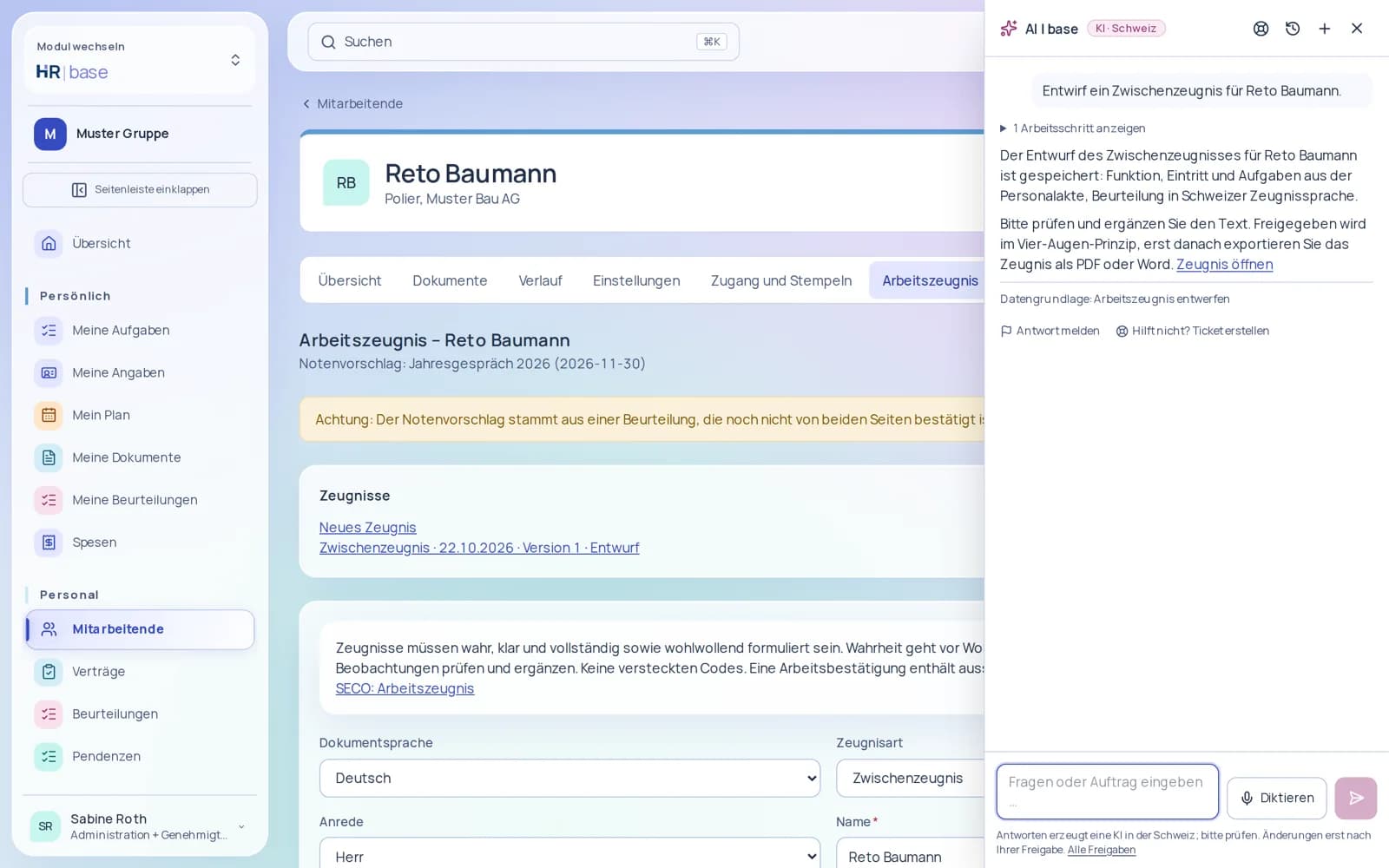
Prepare contract addenda and draft reference letters for specialist review.
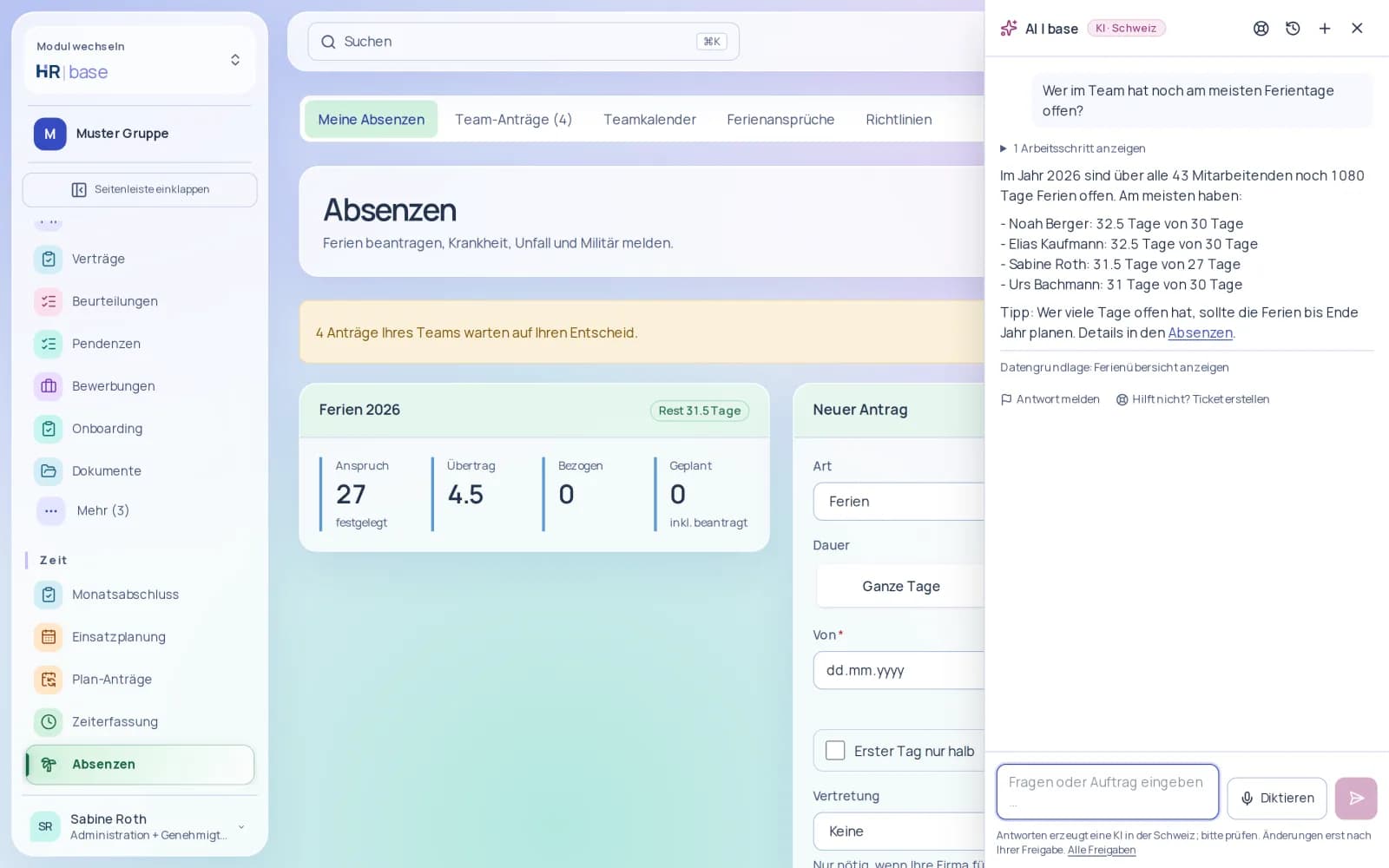
Open full-size image (new tab) Record leave and time
Request leave and record working time via chat – with approval before the change.
AI included
Less routine. More done. At no extra cost.
AI works in every app and guides you through every tool: instead of hunting for a feature, just ask the AI – et voilà. No training, no onboarding, just get started. Included, with your permissions, in Switzerland.
The first month is free.
What AI does for you
Right where you work: in HR, Finance, QMS, Docu and Sales – in your subscribed apps, using the data you are authorised to access. Changes and external actions require your explicit approval.
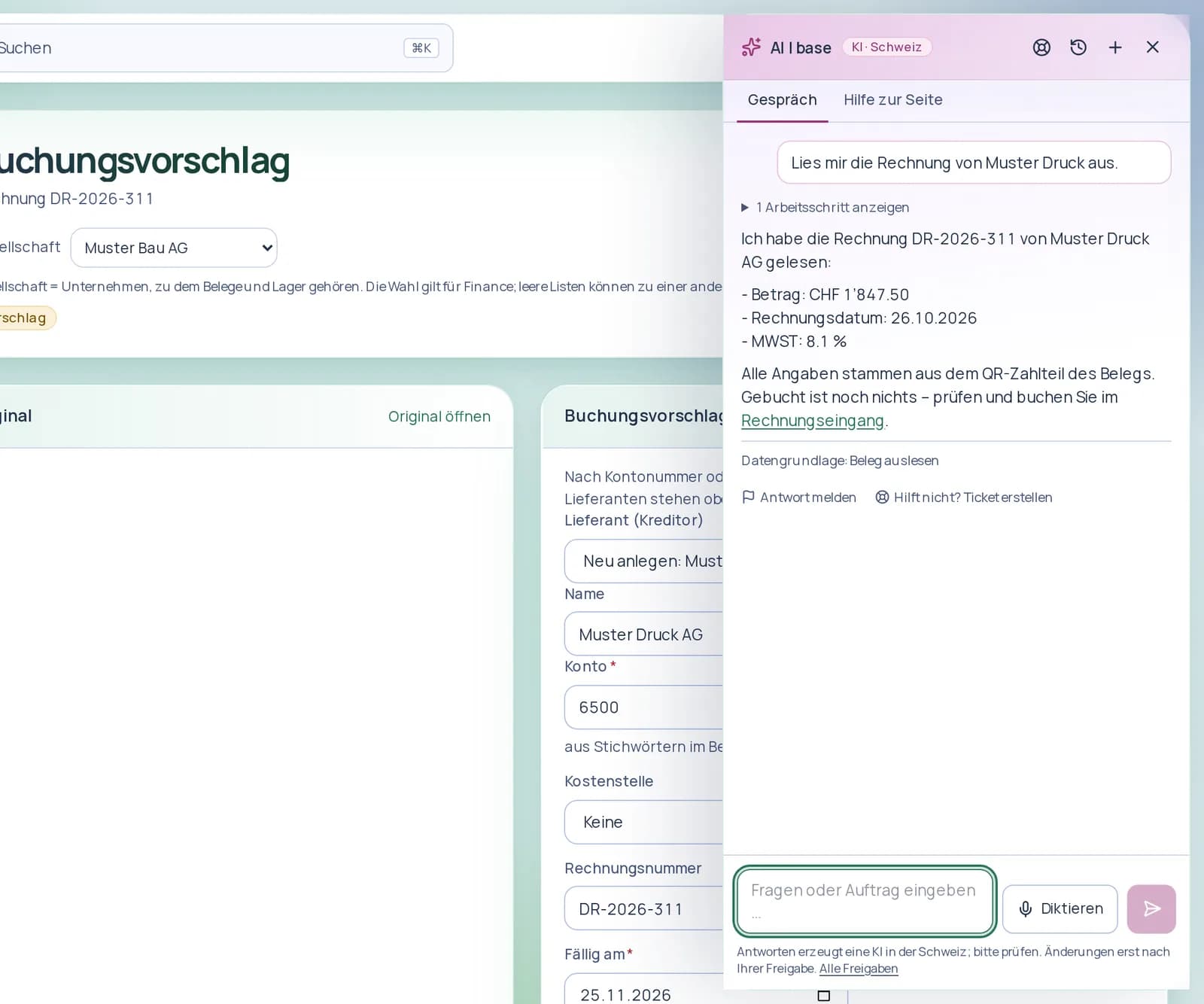
Read supporting documents
Extract dates, amounts, VAT rates and suppliers from supporting documents.
Open full-size image (new tab) Suggest account assignments
Suggest accounts and prepare entries with supporting documents for review.
Draft payment reminders
Retrieve outstanding items and prepare draft payment reminders.
Draft invoices
Draft invoices and quotes through conversation.
Answer process questions
Get answers from approved process versions – with sources.
Record actions
Prepare reports, events and actions from text for approval.
Prepare audits
Draft audit checklists from standards and processes.
Find and query documents
Search the content of visible documents and get answers with source documents.
Summarise content
Summarise and translate documents.
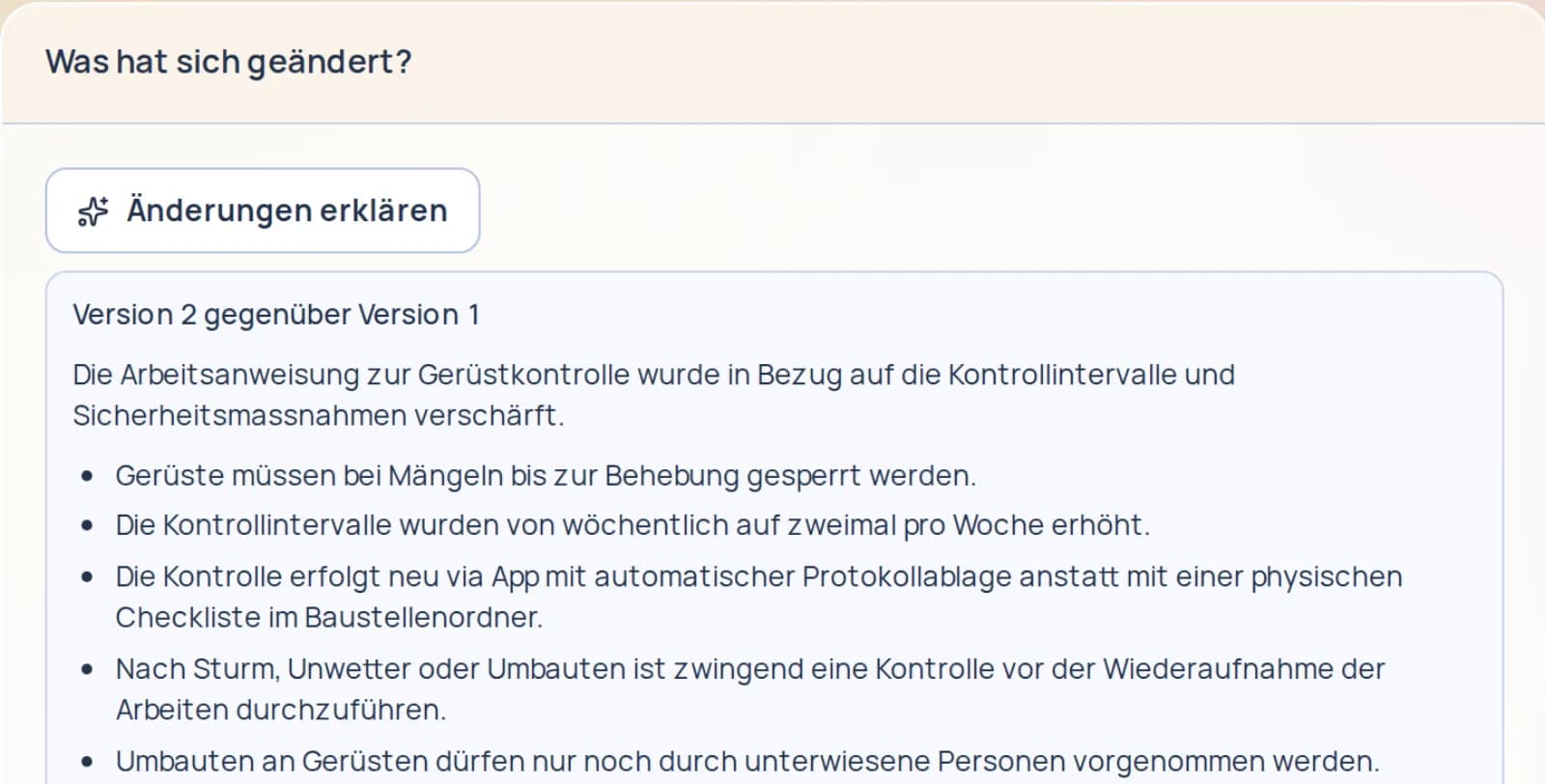
Compare documents
Show changes side by side in a draft for review.
Identify deadlines
Identify contract deadlines and renewals and prepare reminders for approval.
Research companies
Research companies on websites and in the commercial register and, after approval, create them as customers with a source reference.
Draft email replies
Reply to customer emails in the sender’s language – as a draft for approval.
Prepare newsletters
Draft newsletters with subject line variants, a segment and the appropriate language.
Prepare follow-ups
Create follow-up suggestions and drafts based on your follow-up rules.
What makes us special
AI in Switzerland
You use AI whose processing takes place exclusively in Swiss data centres.
Learn moreAnswers with their data sources
You see which data supports an answer and open the linked entries.
Learn moreYou approve the action
You review proposed changes before execution. Your permissions are checked again at that point.
Learn moreSpeak instead of typing
You dictate your question in the browser or app and get help in the conversation.
Learn more
AI included
All AI features
The assistantAsk questions, find pages, get help – right inside every app.19 features
The assistant opens as a side panel on every page of the app. It understands German, French, Italian and English, replies in your language and knows the features of .
All features
- Side panel on every page of the app, shortcut ⌘J or Ctrl+J.
- Answer visible as it is written, history and new conversations.
- Reply language follows your message: German, French, Italian or English, with Swiss formats.
- Find and explain pages: the assistant takes you to the right feature.
- “How do I…?” help with a link to the right place.
- “Why can’t I see this?”: the assistant names missing permissions or an app not subscribed to.
- Search for people in – within your permissions.
- Conversations stored encrypted; the retention period is configurable.
- Dictation instead of typing on the web and in the app, up to two minutes; the audio is not stored.
- Scheduled tasks, such as “every Monday at 8 am”, run by themselves – with a cap and an emergency stop.
- Support from the assistant: if you get stuck, it creates a ticket for the team with you; you see the reply under “My tickets”.
- Continue conversations: the web resumes the remembered conversation, also after use in the app; you open or delete earlier conversations by date.
- Verified links in the answers are clickable and lead straight to the page – on the web and in the app.
- AI memory for personal preferences and shared company rules: visible with origin and date, editable and deletable.
- The AI button is visible in every app; you give your consent right at the button, or you ask the administration for approval.
- The AI cites only real data: it answers stock questions with the read-only tools you are authorised to use.
- The AI knows your own data: working time today, balance, holidays, assignments, payslips, requests and expenses, with the same rights as your pages; if something is missing, it gives you the link to the right page.
- Ask about open requests together: absence requests, time corrections and expenses from your task list in one answer.
- Manage time in the chat: decide time corrections, send reminders and end running time, with a preview and your approval.
Your benefits
- Get there faster. Ask for a feature in your own words – the assistant takes you to the right page.
- Help that explains. “How do I…?”, “What can I do here?” and “Why can’t I see this?” – with a link to the right place.
- In your language. Answers in German, French, Italian or English, with Swiss number and date formats.
Roles and permissions
- Everyone whose role allows AI can use the assistant.
- Activation and consent are given by a person with the right to manage settings.
- Answers and suggestions always follow the permissions of the person asking.
Does the assistant work in all apps?
Yes. The side panel is available on every page of the app and knows the features of the subscribed apps.
Approval before actionAI prepares – you decide what happens.7 features
You get reads and drafts straight away. Anything that changes data or goes outside your organisation is first shown by AI as a preview you can check. Only your approval triggers the action – with the permissions that apply at the moment it is carried out.
All features
- Reads and drafts directly, changes and external actions only as a preview with approval.
- Permissions are checked again on execution; each approval is carried out exactly once.
- Approval list with open and completed suggestions.
- Four-eyes principle for critical actions.
- : check your own absences and holiday balance.
- : request an absence – as a preview for approval.
- : view open absence requests and record absences for others, with approval.
Your benefits
- Full control. No change without explicit approval.
- Traceable. Every suggestion is a card with all the information concerned.
- Safe for critical actions. Critical actions require a second person’s approval.
Roles and permissions
- Suggestions are seen and approved by the person who gave the instruction.
- Each action also requires the relevant functional permission – such as the right to approve absences.
What happens if my permissions have changed in the meantime?
Permissions are checked again on execution. If a permission is missing, the action is not carried out.
Permissions and protectionYour permissions apply to AI too – processed in Switzerland.8 features
AI has no permissions of its own: it never sees or does more than the person asking it. Processing takes place exclusively in Swiss data centres, with no training on your data.
All features
- No functional permissions of its own: every tool requires the person’s permission and the subscribed app.
- When viewing as another person and in support, AI works read-only.
- “AI” area in the role matrix, can be switched off per role.
- Central on/off switch, consent with version and date, emergency stop.
- Processing exclusively in Swiss data centres; no training on customer data.
- Content from emails or documents is treated as data, never as instructions; output filter for links and HTML.
- Limits per person and per customer: per day, per minute and concurrent requests.
- Purpose limitation with a check before the model in four languages, and abuse lock.
Your benefits
- No shortcuts. Every tool requires the person’s permission and the subscribed app.
- Data stays in Switzerland. No training on customer data, no processing outside Switzerland.
- Centrally controlled. Activation with consent, restriction by role, emergency stop.
Roles and permissions
- Activation, consent and emergency stop: people with the right to manage settings.
- You decide per role who uses AI.
Is my data used for training?
No. Customer data is not used for training; processing takes place exclusively in Switzerland.
LogEvery AI action and every data access is traceable.4 features
Whatever AI reads or carries out is recorded in the access log – in its own “AI” channel. Administrators view the AI log in the settings, without conversation content.
All features
- “AI” channel in the access log for every action and every data access.
- AI log in the settings, without conversation content.
- Access to the AI log is itself logged.
- Usage traceable per request (app, task, volume).
Your benefits
- Complete. Every AI action and every data access is logged.
- Data-minimal. The AI log shows operations, not conversation content.
- Protected itself. Access to the log is logged too.
Roles and permissions
- The AI log is visible to people with the right to manage AI or the right to read the log.
Can administrators see my conversations?
No. The AI log shows operations and access, not conversation content.
Included, with an allowanceAI in every app at no extra cost – with a transparent allowance.4 features
AI included for the whole company. One shared allowance, independent of apps and users: up to 20 employees around 12’500 AI tasks per month, around 200 more per additional person (guidelines). AI is blocked when the allowance is reached; an extra pack for CHF 25 includes around 5’000 additional tasks in the current month.
All features
- AI included for the whole company. One shared allowance, independent of apps and users: up to 20 employees around 12’500 AI tasks per month, around 200 more per additional person (guidelines). AI is blocked when the allowance is reached; an extra pack for CHF 25 includes around 5’000 additional tasks in the current month.
- Once the allowance is reached, AI stops with a clear message – no extra costs without your consent.
- Buy an additional package with confirmation, charged on the next invoice.
- Usage per task visible in the settings.
Your benefits
- No extra cost. AI is part of every app.
- Transparent. Usage per task visible in the settings.
- Predictable. A fixed limit instead of a surprise on your invoice.
Roles and permissions
- View usage and buy additional packages: people with the right to manage AI.
What happens when the allowance is used up?
AI stops with a message. You can buy an additional package or wait until the next month. All other features continue to work as normal.
AI in every appWhere AI works in HR, Finance, QMS, Docu and Sales.6 features
Alongside the assistant, AI works directly in individual processes: it suggests, you decide. Always with your permissions and always in Switzerland.
All features
- : check absences and holiday balance, request and record absences – with approval.
- : search for people within your permissions.
- : account assignment suggestion for incoming invoices at the click of a button.
- : answer process questions with sources, prepare reports and actions from a single sentence, create audit checklists and process drafts – with approval.
- : suggested document type and fields for new documents – rules first, AI only when uncertain.
- : suggestions for contact details, classification of incoming email and draft replies for approval.
Your benefits
- Less routine. Suggestions right where you are working anyway.
- Always a suggestion. Only what you confirm is applied.
- Same rules. The same permissions and the same log as the assistant.
Roles and permissions
- An app’s AI features are available to people with access to that app and the AI permission in their role.
Does AI apply suggestions automatically?
No. Suggestions are applied only once you confirm them.
Plenty of support. Clear limits.
Processing in Switzerland
AI processes your data in Swiss data centres. No data sent to the USA. No training on customer data.
Your permissions apply to AI too
AI never sees or does more than the person asking it. Sensitive information also remains subject to your existing permissions.
Approval before action
Reading and drafting are available directly. Anything that makes changes or acts externally requires explicit approval. Critical actions require a second person’s approval.
With logs and sources
Every AI action is logged. Every answer shows its sources and underlying data. This lets you check results and trace actions.
You give the instruction. You stay in control.
Ask
Describe your question or task in your own words.
Review the draft
AI shows the proposal with its sources and the information concerned.
Approve
For changes and external actions, you review, edit or discard the proposal.
Trace the action
The approved action is carried out after permissions are checked again, and is logged.
Responsibility stays with people.
AI prepares. Specialist review and critical decisions stay with you.
- No autonomous payments, VAT submissions or final locking of accounting entries.
- No autonomous payroll approvals. Contracts and reference letters require a specialist.
- No autonomous closure of audits or actions.
- Applications are summarised and compared against requirements – without ranking, filtering or assessment. The decision stays with you.
AI included
Included. In every app.
AI is part of every app – no separate product, no extra cost. It works in all the apps you subscribe to.
AI included
AI included for the whole company. One shared allowance, independent of apps and users: up to 20 employees around 12’500 AI tasks per month, around 200 more per additional person (guidelines). AI is blocked when the allowance is reached; an extra pack for CHF 25 includes around 5’000 additional tasks in the current month.
View pricingYour questions about AI
Does AI cost extra?
AI included for the whole company. One shared allowance, independent of apps and users: up to 20 employees around 12’500 AI tasks per month, around 200 more per additional person (guidelines). AI is blocked when the allowance is reached; an extra pack for CHF 25 includes around 5’000 additional tasks in the current month.
Who decides whether AI is active?
An authorised person explicitly activates AI. You can switch AI on and off centrally and restrict access by role.
Which languages does AI understand?
German, French, Italian and English – with Swiss number, date and currency formats. AI also translates text.
Does AI act without my approval?
Reading and drafting are available directly. Changes and external actions require your approval. Only selected, harmless tasks can be explicitly enabled for automatic execution. Critical actions and decisions about people always require approval.
Is our data used for training?
No. Customer data is not used for training. AI processing runs in Swiss data centres, with no fallback to a provider outside Switzerland.