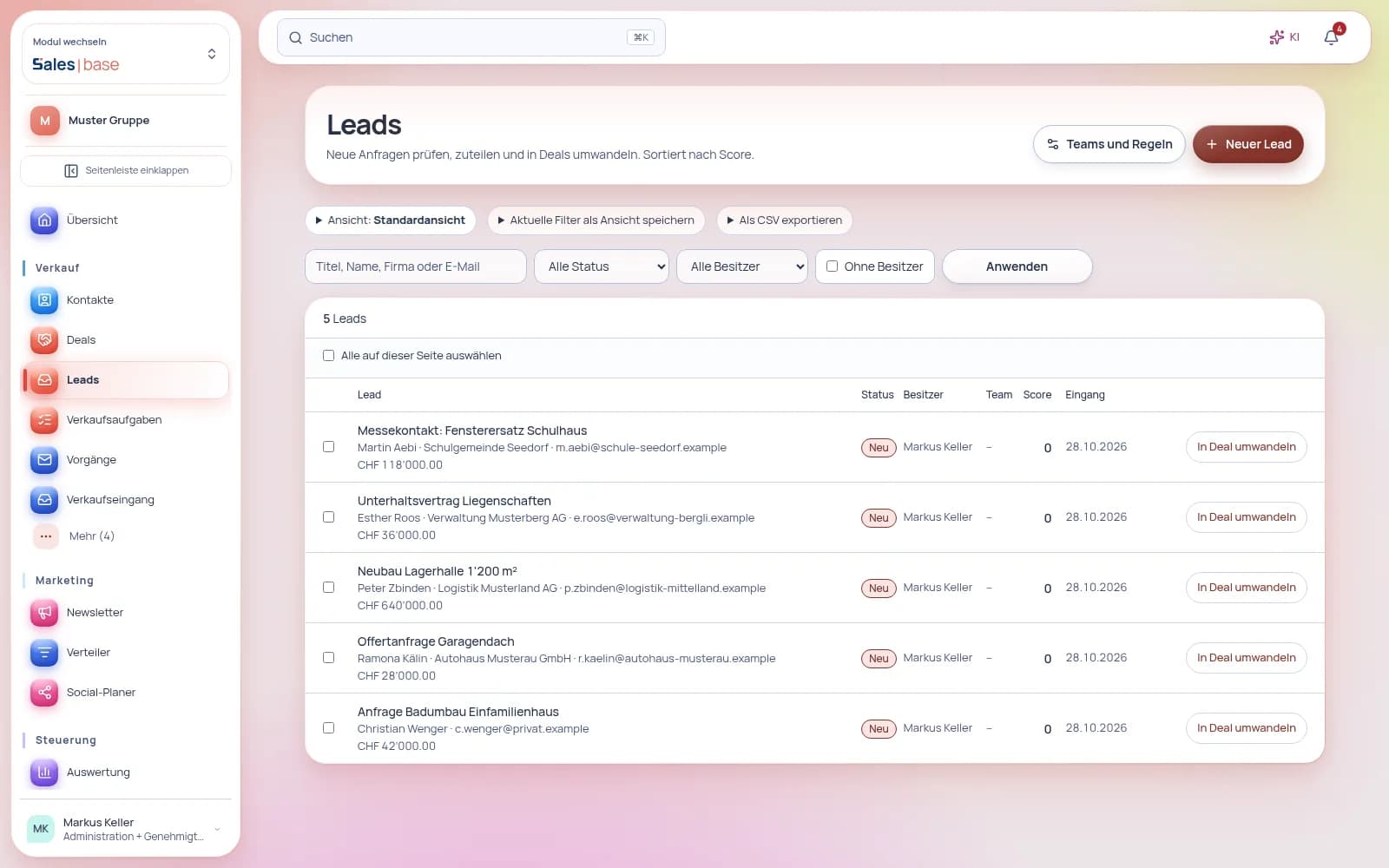
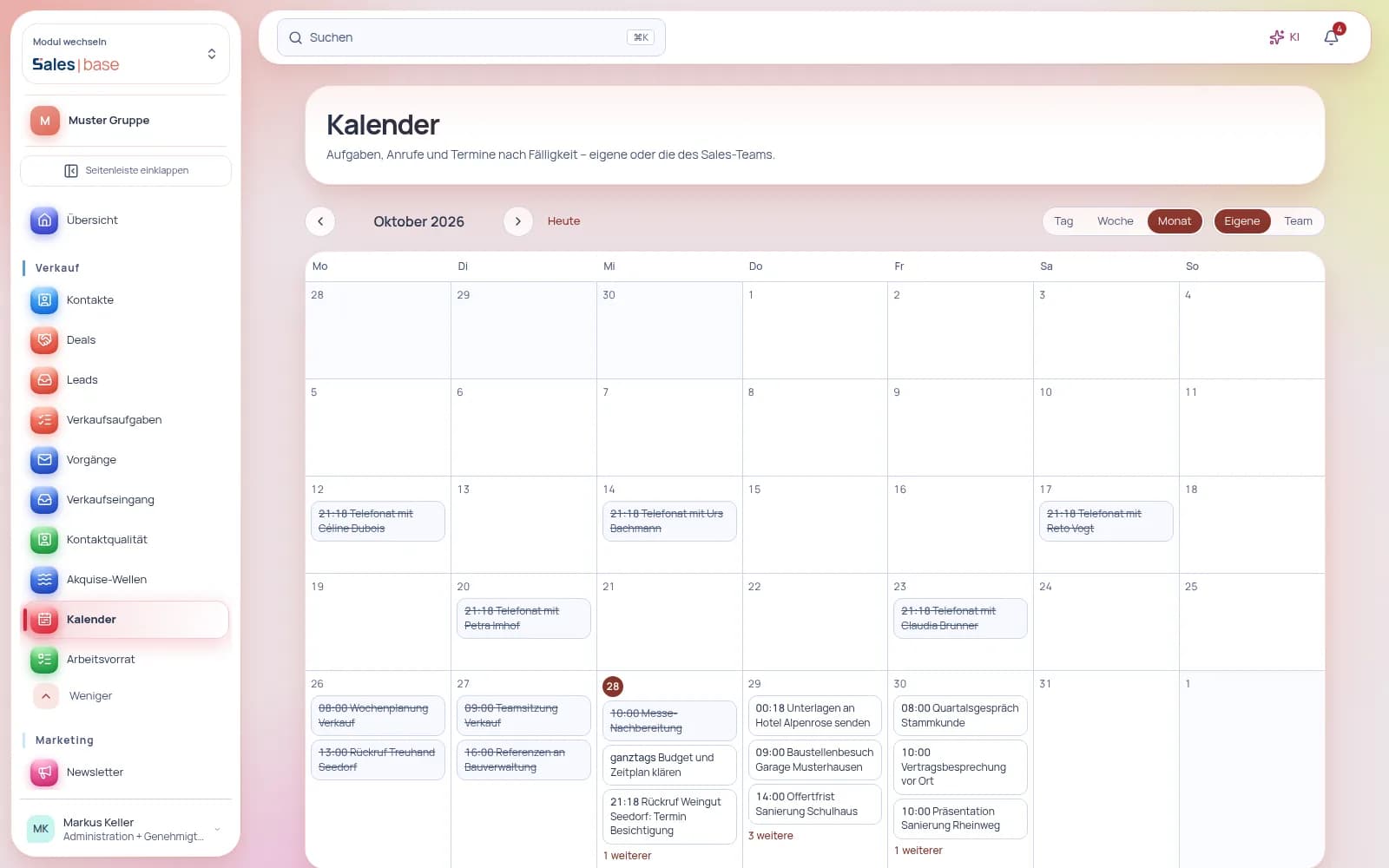
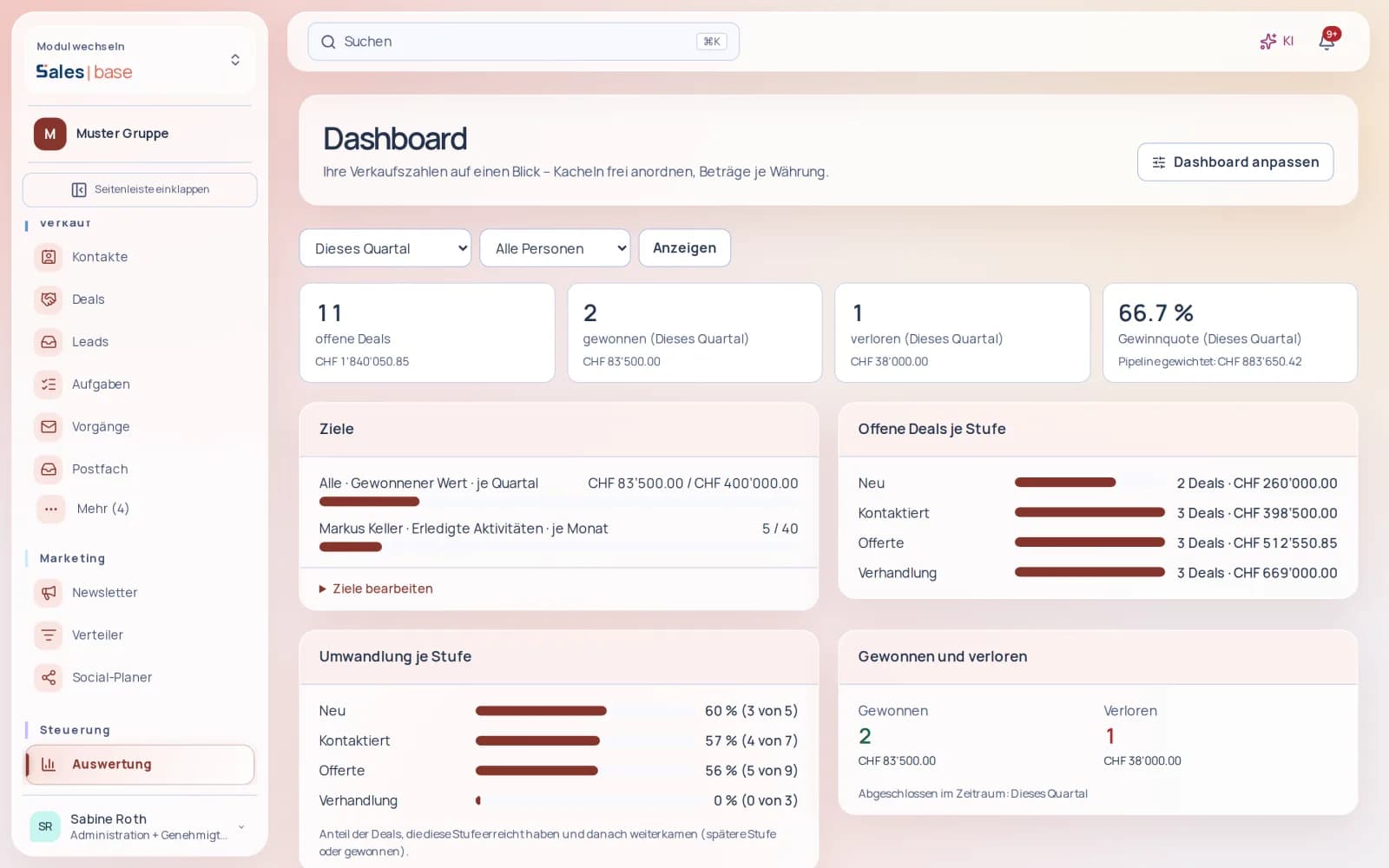
Contacts, deals and newsletters in one place – and the deal turns into quote, order and invoice directly in Finance | base, with a QR invoice and no retyping. You can see at any time what is won but not yet invoiced.
Your deals live in an Excel list – and nobody knows which version is current?
Solution
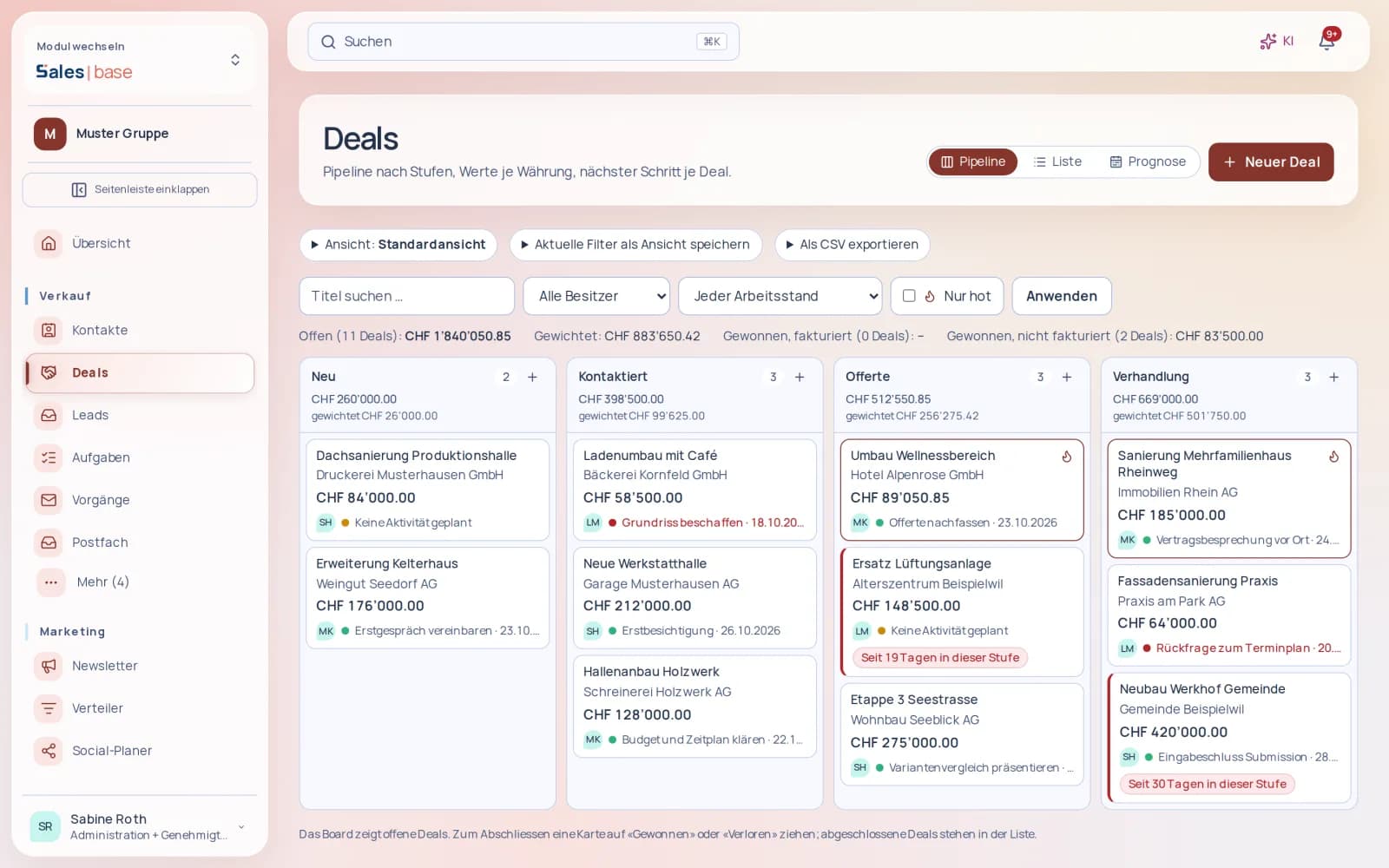
All sales opportunities on one board: count, total and weighted value for every stage. Drag a deal into the next stage – done. Swiss francs and euros stay cleanly separated.
Forgot to follow up because the appointment was only in your head?
Solution
Every card shows the next activity with a traffic light: green scheduled, yellow nothing scheduled, red overdue. Complete an activity and you are asked for the next step straight away – as a must, if you wish. Deals that sit in one stage too long are flagged.
You write the quote in Word, then retype the invoice in your accounting?
Solution
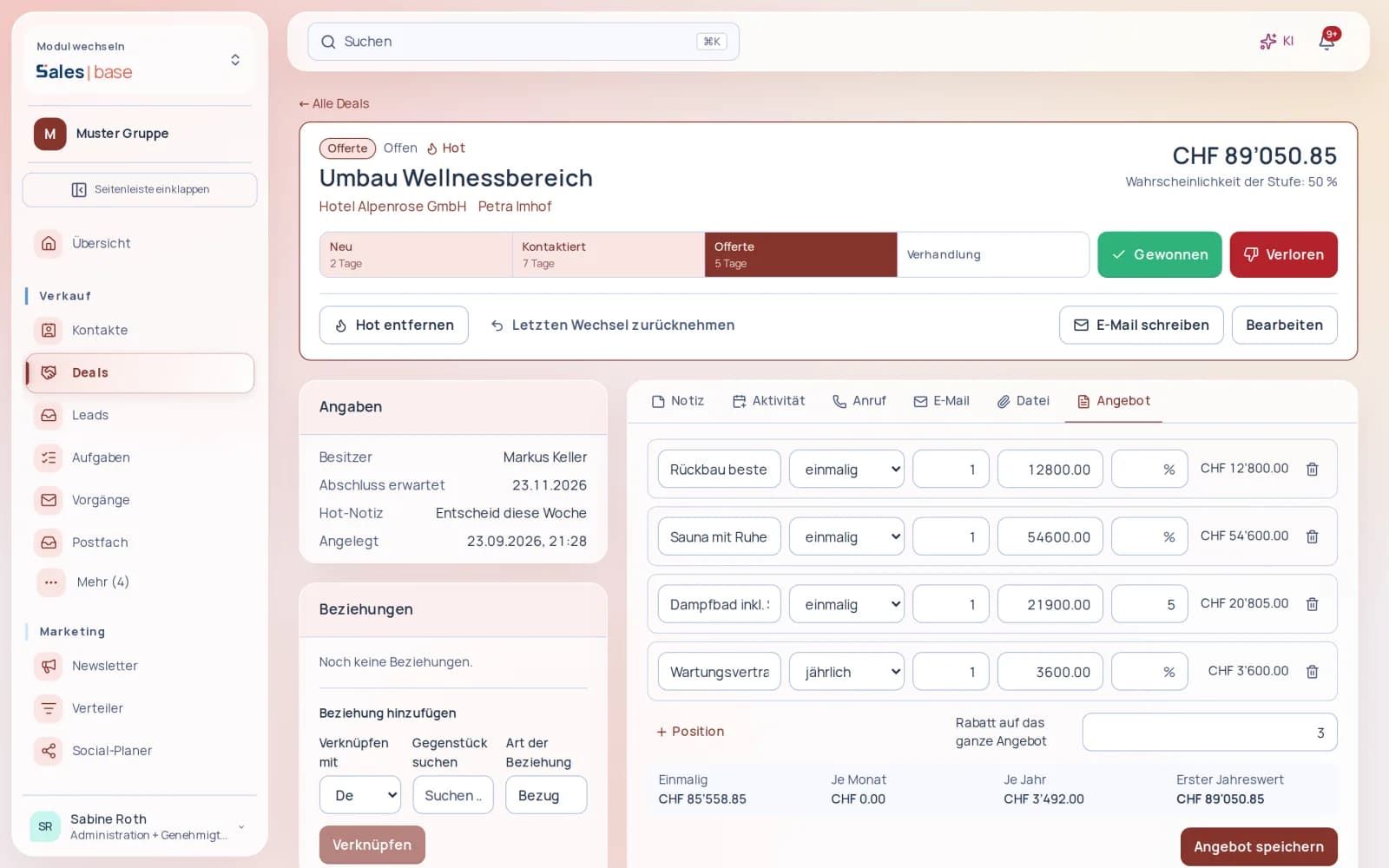
Build the offer in the deal from your products – one-off, monthly or annual, with a discount. One click turns it into the quote, then the order and the invoice with QR code in Finance | base. You see what is won but not yet invoiced.
At month-end, you don’t know what’s coming in next quarter?
Solution
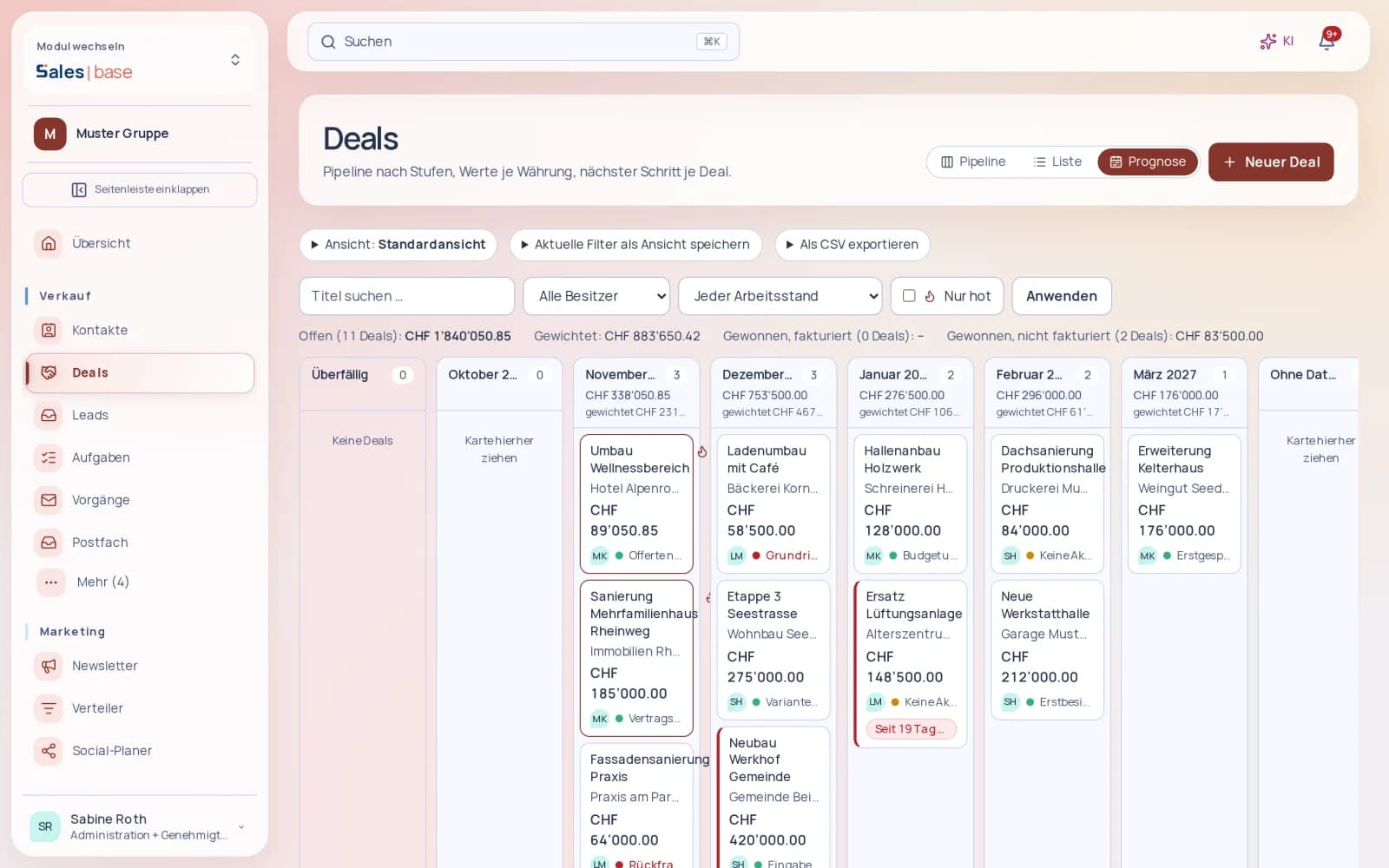
The forecast shows your open deals by expected closing month, with total and weighted value per month. Reports show win rate, time in stage and why deals are lost.
Web forms hand enquiries straight over as leads – with a score and a duplicate warning. Emails to the sales mailbox are classified and prepared as a case with a draft reply; you check, adjust and approve.
Newsletter, distribution lists and social media posts live in three different tools?
Solution
Newsletters built from blocks with a live preview and five templates in four languages. You assemble distribution lists by industry, place, open deal or owner and immediately see how many contacts they reach. Sent from your own domain, only to addresses with consent, unsubscribe in one click; opens and bounces feed the statistics. You plan Facebook and Instagram posts in the same tool.
Sales | base
Just another Monday
Before
At eight, you search three Excel lists to find out which customer expects an answer this week.
Friday’s enquiry sits unread in the shared inbox.
For the quote, you copy prices from the last Word file and then retype them in accounting.
In the evening, you don’t know whether your team followed up on the important deals today.
After
At eight, “To do today” shows what is due – overdue items first, in red.
Friday’s enquiry is waiting for your approval as a case with a ready-made draft reply.
The quote is created from the deal and goes straight into accounting as a document with a QR invoice.
On the board, you see at a glance where a next step is missing – and at five, you call it a day.
Quote, order and invoice are created directly from the deal – in Finance | base, with a QR invoice and no retyping. If you wish, the deal follows the documents, and you can see at any time what is won but not yet invoiced.
02
Swiss company data and consent – on record.
Company details such as UID, registered office, legal form and commercial register status come with their source from the federal government’s public UID register. Every consent is recorded per address and purpose, newsletters only go to addresses with consent, and unsubscribes take effect immediately.
03
Nothing goes out unchecked.
Enquiries from the mailbox are classified and prepared with a draft reply; only the approved version is sent, exactly once. You decide who edits and who approves – management can also approve on the go via a single-use link.
Free data migration by KMU | base, within 24 hours on working days. When you commission data migration by KMU | base, the paid subscription and minimum term start immediately; this ends the free month. Upload your data securely through your dashboard under Settings › Data migration.
one click creates the quote in Finance | base, one-off, monthly or yearly and with a discount; after acceptance, order, invoice and series follow. Nothing is issued until you have checked it.
Standard pipeline and opportunities from files
you adopt the sales stages with one click; opportunities from your current CRM are imported with a dry run and an undo.
Custom fields with formulas
eleven field types up to formulas, as a required field per stage or confidential if you wish.
Workflows with triggers
new leads, stage changes, tags or date fields start a workflow; emails follow the same blocks and limits as outreach, and the workflow stops on a reply.
Write once, several channels
a title, text and link become drafts for the newsletter, Facebook and Instagram; comments and lead ads arrive as cases. Nothing is published until you approve it.
Newsletters from your own domain
sending runs through your domain with a check of the DNS records; bounces, complaints and unsubscribes block the address immediately.
Pipeline board
Drag deals through the stages, with totals per stage and closing via “Won” or “Lost”.
Traffic light for the next step
Every card shows whether the next activity is scheduled, open or overdue – stalled deals stand out.
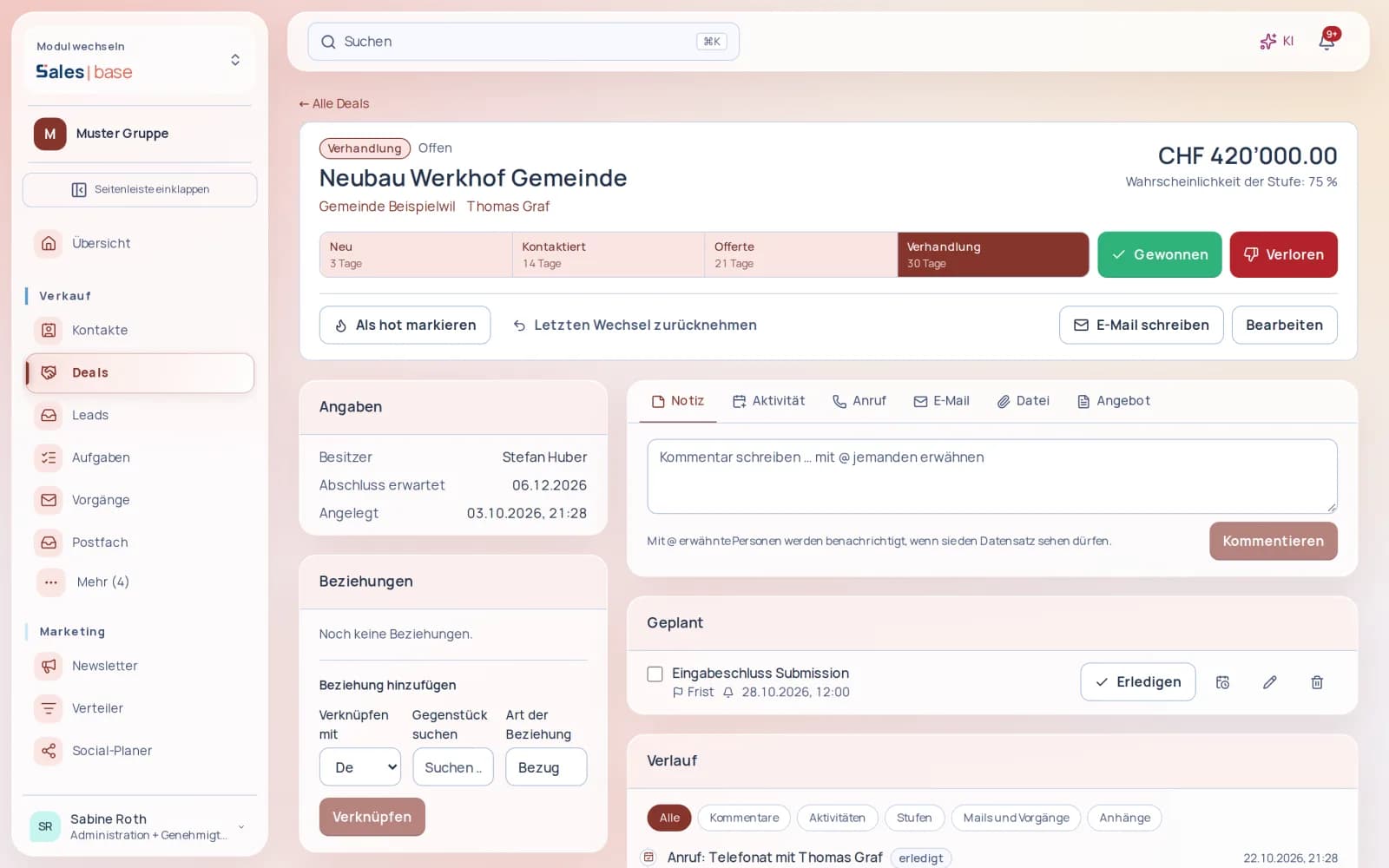
The deal on one page
Stage bar with days per stage; note, call, activity, email, file and offer in one place.
Offers with line items
One-off, monthly or annual, with a discount – then order, invoice and series in Finance.
Mailbox as sales inbox
A connected mailbox (Microsoft 365, Google, IMAP) classifies enquiries and prepares replies.
Newsletter with building blocks
Assemble content from heading, text, image and button, and see alongside how it will look.
A complete app
No plugins. No modules.
Everything included.
Sales | base is a complete app – not a basic package that you first have to put together with paid extra modules. All 8 areas with 83 features, the AI and all updates are included in the price.
Common practice: the building-block model
A basic package – plus an extra module, a plugin or an add-on with its own price for every further area.
Basic packageExtra cost
Extra moduleExtra cost
Extra moduleExtra cost
PluginExtra cost
Add-onExtra cost
AI at extra costExtra cost
Many building blocks. Many prices.
With Sales | base: one complete app
All 8 areas
83 features
AI included
All updates included
Contacts and companies
Pipeline and deals
Activities and daily desk
Inbound mail and approval
Follow-ups and outreach
Newsletters and campaigns
Reports
Data transfer and knowledge
One app. One login. Everything included.
alesbase
Areas in one app
88
Features included
8383
Extra modules needed
00
AI at no extra cost
incl.incl.
Features
Everything this app includes.
Sales | base is your CRM and your marketing system: contacts, pipeline, offers and emails, plus newsletters with distribution lists, social planner, statistics and follow-ups in one tool. Replies only go out after your approval, follow-ups follow fixed rules, and newsletters only reach addresses with recorded consent.
Contacts and companiesCompanies and people without duplicates – with consent, source and a complete timeline.10 features
A CRM is only as good as its contact data. Sales | base prevents duplicates at the point of entry, shows where every value comes from and records what a person has consented to. The timeline shows everything that has happened with a contact.
All features
Search, filter and link companies and people – with detail view, master data and notes.
Several addresses per contact with a primary address, automatic normalisation and duplicate protection.
Merge contacts with a field preview, exclude or block them.
Tags, including as a bulk action, plus categories and visible source.
Source priority and previous values: you see where a value comes from and what applied before.
Pre-qualification A, B or C with reason, potential column and filter.
Consent per address and purpose, delivery and business blocks, signed unsubscribe and withdrawal.
Timeline per contact with activities, deals, sends and consents.
Accept or reject AI field suggestions; UID lookup with sources.
Adopt the standard pipeline with one click; duplicate warning when creating a company.
Your benefits
One company, one record. Duplicate protection, normalised addresses and merging with a field preview keep your data clean – even after years.
Consent on record. Consent per address and purpose, blocks and signed unsubscribes are documented. If someone asks what a contact is based on, you can show it straight away.
The right ones first. Pre-qualification A, B or C with a reason and a potential column shows your team where the next call is worth making.
Roles and permissions
View contacts: everyone with access to Sales | base and read permission for contacts.
Create, edit, merge and block contacts: people with edit permission for contacts.
The role templates “Sales”, “Sales management” and “Marketing” already include the appropriate permissions.
What happens when two contacts are merged?+
The field preview shows for each field which value is kept, before you confirm. Two records become one, with no guesswork.
How traceable are AI suggestions?+
Sales | base suggests values for fields; you accept or reject them. The UID lookup shows the sources a value is based on, and previous values remain visible.
Pipeline and dealsEvery deal with stage, value and history – as a Kanban board or list, accurate to the centime.12 features
The pipeline shows where each opportunity stands and what it is worth. You set up stages, loss reasons and sources to match your sales process; stage changes remain traceable, and totals are accurate to the centime in every currency. You put together offers with several line items directly in the deal and hand them over to Finance | base.
All features
Create, edit and delete deals – with version checks so that simultaneous changes overwrite nothing.
Pipeline as a Kanban board and as a list.
Stage history per deal and undo of the last stage change.
Won or lost, with a mandatory loss reason.
Won deals split into invoiced and uninvoiced.
Hot flag with note and your own operational stages.
Totals per currency, accurate to the centime.
Set up pipeline, stages, loss reasons and sources yourself.
Offer in the deal built from products with several line items – one-off, monthly or annual, with a discount per line and on the whole offer.
Handover to Finance | base: the order creates an invoice for one-off items and a series for each billing cycle, exactly once.
Custom fields on deals in eleven types, also with formulas.
Continue quotes from the deal in Finance | base and generate PDFs there with your own logo and document design.
Your benefits
A clear view of sales. Kanban for day-to-day work, the list for the overview – both show the same deals with their stage history.
Learn from losses. Whoever loses a deal gives the reason. That shows you whether price, timing or competition made the difference.
Won does not mean invoiced. Won deals are split into invoiced and uninvoiced – anything still to be billed stands out immediately.
Roles and permissions
View deals and pipeline: people with read permission for deals.
Create, edit and close deals: people with edit permission for deals.
Set up pipeline, stages, loss reasons and sources: people with the administration permission for settings and automation, typically sales management.
Can we run deals in euros?+
Yes. Each deal has its own currency, and totals are shown separately per currency – exact, with no rounding differences.
What happens after a wrong stage change?+
You undo the last change. The stage history remains traceable.
Activities and daily deskCalls, meetings and tasks under control – and exactly one next step for every deal.8 features
Sales rarely fail because of the product, often because of a forgotten call-back. Sales | base requires exactly one next step for every open deal and shows on the daily desk what matters today.
All features
Record activities as call, email, meeting, task or note.
Due date and reminder per activity.
Complete with an outcome or postpone to a new time.
Exactly one next step per deal.
Deals without a next step and overdue tasks at a glance.
Daily desk with cases, hot deals, tasks, deals without a step and totals.
Task overview with all open and overdue tasks.
Requests and tickets to teams such as IT, HR, finance, QMS or facilities – across all apps, with queues, due dates and conversion into tasks.
Your benefits
Nothing slips through. Deals without a next step and overdue tasks are visible before a customer has to chase you.
The day on one page. The daily desk shows cases, hot deals, tasks due, deals without a step and totals.
Outcomes, not ticks. Whoever completes an activity records the outcome. The contact’s timeline then tells the whole story.
Roles and permissions
View activities, tasks and the daily desk: people with read permission for deals.
Record, complete and postpone activities: people with edit permission for deals.
Why exactly one next step?+
A single, scheduled step is more binding than a loose list. It shows who does what by when – and deals without a step stand out immediately.
Inbound mail and approvalIncoming emails classified, replies as drafts – only what is approved goes out.12 features
Sales | base classifies emails sent to your system addresses: enquiries, rejections, meeting requests, unsubscribes or bounces. Each reply becomes a case with a draft. Approval applies to exactly the version that was checked – and nothing is sent twice. A connected M365 mailbox can also serve as the inbox.
All features
Classify inbound mail: enquiry, rejection, put-off, meeting request, unsubscribe, bounce, erasure request and more.
Private emails are recognised and protected.
Create a contact with its source from an enquiry.
Cases with a ready-made draft reply.
Approval tied to the exact version, with no duplicate sending.
Approval email to management with a single-use link.
Reply in the existing thread, with signature and sender per brand.
The reply language follows the content of the incoming email.
Connect an M365 mailbox and send directly from Sales | base.
M365 mailbox as the Sales inbox: enquiries are classified and prepared as a case with a draft reply; the message content is only loaded when needed.
System addresses per purpose with a set-up page and IMAP inbound.
Replies straight from your own mailbox (Microsoft 365, Gmail, IMAP): the email sits in your Sent folder, and the reply still lands with the contact.
Your benefits
Inbound sorted. Enquiries, rejections, put-offs, meeting requests, unsubscribes, bounces and erasure requests land where they belong; private mail stays protected.
Approval that counts. The exact version is approved. If the text changes afterwards, a new approval is needed.
Replies in the right tone. The reply appears in the existing thread, with signature, in the language of the enquiry and with the sender of the right brand.
Roles and permissions
Work on cases and adjust drafts: people with edit permission for cases.
Approve drafts: people with approval permission for cases – separate from editing, so you decide who has the final say.
Which email accounts can be connected?+
For sending, you connect your M365 mailbox. For inbound mail, you use a connected mailbox, such as your M365 mailbox, or system addresses per purpose, connected via IMAP.
Can a reply go out twice?+
No. Each approval belongs to exactly one version, and Sales | base prevents duplicate sending.
Follow-ups and outreachFollow up by rule, not by memory – with stop on reply and an emergency stop.10 features
Following up wins business when it keeps the right rhythm and stops in time. Sales | base schedules follow-up sequences from templates, stops at every reply and only sends automatically if you explicitly switch it on.
All features
Follow-up sequences from templates, for example after 7 and 14 days and then every 90 days; the cadence can be changed and is versioned.
Idle lock: follow-ups can be paused and resubmitted.
Stop on reply – even when another person from the same company replies.
A rejection closes the case, a put-off creates a reminder, a meeting request a task.
Draft queue for review before sending.
Automatic sending only with a switch, with emergency stop and weekday window.
Daily and per-run caps limit the number of emails.
Quality control of drafts: spacing, salutation, prohibited promises and placeholders.
Outreach waves for first contacts: oldest contacts first, started only by a person.
Protection against a duplicate first contact.
Your benefits
Rhythm, not chance. Sequences from templates, for example after 7 and 14 days and then every 90 days – equally reliable for every contact.
Stops in time. If someone from the same company replies, the sequence stops. A rejection closes the case, a put-off sets a reminder, a meeting request becomes a task.
You stay in control. Drafts wait in a queue. Automatic sending only with a switch, within the weekday window, with daily and per-run caps and an emergency stop.
Roles and permissions
Manage follow-up sequences, outreach waves and sending switches: people with the administration permission for settings and automation.
View the status of sequences and waves: people with read permission for deals.
Does Sales | base send follow-ups on its own?+
Only if you switch this on. Otherwise drafts stay in the queue until someone checks them. The emergency stop halts all automatic sending immediately.
What happens when someone replies?+
The sequence stops – even if another person from the same company replies. Depending on the reply, Sales | base closes the case, sets a reminder or creates a task.
Newsletters and campaignsNewsletters that arrive: Outlook-ready templates, recorded consent, honest statistics.12 features
In Sales | base, campaigns are built from templates, go out after approval to a precisely defined distribution list and only reach addresses with recorded consent. The statistics separate genuine opens and clicks from automated access by link scanners. You plan social media posts in the same place and publish them directly on your channels.
All features
Campaign with sender, distribution list, subject, preview text and HTML and text versions – based on five Outlook-ready templates in four languages.
Newsletter editor with building blocks – heading, text, image, button, divider – and live preview; personal details are inserted with a click.
Distribution list as a tag expression with an exact recipient count, frozen when sending starts.
Desktop, mobile and text preview; test send in one click.
Approval tied to the content; scheduling with a date; pause, resume or cancel.
Sending with warm-up plan, throttling and protection against duplicate sending, with live progress.
Bulk sending from the verified sender of your domain (SPF, DKIM and DMARC checked with one click), even to over 100’000 recipients; bounces, complaints and unsubscribes block the address immediately.
Sending only to addresses with recorded consent per purpose; one-click unsubscribe; returns and bounce suppression.
Public newsletter archive.
Statistics: opens raw, automated and adjusted, clicks with link-scanner detection and click targets.
10’000 emails are included per month. Each additional 1’000 emails costs CHF 2.–. Sales | base warns you before the allowance is exhausted.
Social media: plan posts with a pool of topics and publish them directly on your channels; scheduling counts as approval.
Your benefits
Professional without an agency. Five newsletter templates in four languages, Outlook-ready, with desktop, mobile and text preview.
Consent on record. Sending only with recorded consent per address and purpose, with one-click unsubscribe and bounce suppression.
Figures you can trust. Opens raw, automated and adjusted; clicks with link-scanner detection. You see what was really read.
Roles and permissions
Create and edit campaigns, distribution lists and social posts: people with marketing edit permission.
Approve and send campaigns: people with marketing send permission – separate from editing.
Why raw and adjusted opens?+
Email programs and security filters open emails automatically, and link scanners click on links. Sales | base shows this automated access separately so that your figures reflect genuine interest.
How many emails are included?+
10’000 emails are included per month. Each additional 1’000 emails costs CHF 2.–. Sales | base warns you before the allowance is exhausted.
ReportsFunnel, win rate and loss reasons – the figures a sales meeting needs.8 features
Sales analysis shows how deals move through the stages, where they get stuck and why they are lost. It is complemented by newsletter statistics per campaign and sender, plus the status report and data quality in diagnostics.
All features
Sales funnel across all pipeline stages.
Win rate.
Time in stage.
Analysis of loss reasons.
Totals per currency, accurate to the centime.
Newsletter statistics per campaign and per sender.
Status report in diagnostics.
Data quality check.
Your benefits
Spot bottlenecks. Time in stage shows where deals stall – for example between initial conversation and negotiation.
Learn from losses. Because the loss reason is mandatory, it can be analysed. You see why deals fall through.
A sound basis. The status report and data quality show whether the data behind the figures is right.
Roles and permissions
View reports: people with read permission for deals.
Anyone who may not see deals cannot see the related reports either.
Does the analysis convert euros into francs?+
No. Totals are shown separately per currency so that no conversion distorts the figures.
Data transfer and knowledgeMove safely from your current CRM – and capture what your sales team knows.11 features
Switching CRM is often the biggest hurdle. Sales | base takes over your data with a trial run and rollback, matches it against existing records and creates no duplicates on a repeat import. In-house knowledge captures what your sales team knows: rules, experience, customer and market knowledge.
All features
Import from your current CRM with a trial run.
Rollback of an import.
Matching against existing records.
Repeat import without duplicates.
In-house knowledge by rule, experience, customer and market – with source and validity.
Accept or reject suggestions for in-house knowledge.
Help texts for every page of Sales | base in four languages.
AI features run through the AI gateway in Switzerland.
Import directly in the list: for contacts, companies and opportunities with its own button next to creating, in empty lists on a par with “Add”.
Mapping assistant: recognises columns even with differing headers or by content, splits columns and shows reasoning and confidence for every suggestion; with AI switched on it helps without ever receiving cell values.
Recognise the same company or person: you link to the existing entry instead of creating a duplicate.
Your benefits
A move with a safety net. The trial run shows what will be imported. If it is not right, you roll back.
No duplicates. Matching against existing records and repeat imports without duplicate records.
Knowledge stays in-house. In-house knowledge with source and validity is retained – even when someone leaves the team.
Roles and permissions
View in-house knowledge: everyone with access to Sales | base.
Maintain in-house knowledge and accept suggestions: people with the administration permission for settings and automation.
Run and roll back imports: people with the permission to run imports.
What if the import is not right?+
You roll back the trial run, adjust the data and import again – without duplicates.
What is validity for in in-house knowledge?+
Knowledge ages. With source and validity, you see what a rule is based on and until when it applies.
Working together
One workflow across all apps.
When you subscribe to several apps, your business functions connect. Shared users, roles and permissions determine access.
Finance | base
Connect deals to quotes, orders and invoices. Finance | base manages items, prices and binding documents; Sales | base shows their link to sales.
Docu | base
Use contract templates, versions and sharing links in your sales process. Contract files and signature evidence remain managed in Docu | base.
QMS | base
Pass complaints to QMS | base with their customer context. Sales | base displays the permitted processing status, while QMS | base manages the quality work.
One login. Four languages. Data in Switzerland.
Work in German, French, Italian or English. The shared platform is hosted in Swiss data centres.
Switzerland · Your permissions · Approval before action
AI included in Sales | base
Research companies
Research companies on websites and in the commercial register and, after approval, create them as customers with a source reference.
Draft email replies
Reply to customer emails in the sender’s language – as a draft for approval.
Prepare newsletters
Draft newsletters with subject line variants, a segment and the appropriate language.
Prepare follow-ups
Create follow-up suggestions and drafts based on your follow-up rules.
Your price for Sales | base: base price plus app, by employee count. All features, all users, AI and storage are included.
Online base: CHF 49 per month per website – shop included, redesign included. Plus the KMU base base price of CHF 49 per month, charged once (covers all apps together). Website only: CHF 98 per month. You run the shop directly from Finance | base: products, stock, orders and invoices, fully integrated. The shop requires Finance | base. Minimum 12 months. Migration included.
Base priceCHF 49.–User and permission management, access, mobile app, AI and storage for the whole company. Stays the same above 20 employees.
Per appCHF 29.–HR, Finance, QMS, Docu, Sales: your choice, at least one. Price up to 20 employees.
Per app and additional person+CHF 1.–For each person above 20 employees. Below 20, the price for 20 applies.
Included for the whole company: up to 20 employees around 12’500 AI tasks per month (guideline) and 100 GB of storage; per additional person around 200 AI tasks and 2 GB more.
The first month is free, followed by a minimum term of 12 months. Above 1’000 employees, we prepare a quote. Request a quote
Only when you need it
SMS and post at pass-through cost
AI extra pack CHF 25.–, around 5’000 additional AI tasks in the current month
An extra 100 GB of storage for CHF 10.– per month
Sales emails above 10’000 per month: CHF 2.– per 1’000
3 companies included, each additional company CHF 25.– per month
Dedicated server in Switzerland: CHF 390.– per month; included from 1’000 employees with at least 3 apps. Above 1’000 employees, a quote includes a dedicated server with at least 3 apps.
No setup fees, free data migration. When you commission data migration by KMU | base, the paid subscription and minimum term start immediately; this ends the free month.
The first month is free. When you commission data migration by KMU | base, the paid subscription and minimum term start immediately; this ends the free month.
Sales | base is the complete CRM app from KMU | base: contacts, deals, quotes and newsletters in one place. A won deal becomes an invoice in Finance | base. AI is included, and the data stays in Switzerland.
How much does Sales | base cost?+
Sales | base costs CHF 29.– per month for up to 20 employees, plus the base price CHF 49.–, excl. VAT. All users included. The first month is free.
Can we take over our data from our current CRM?+
Yes. The import starts with a trial run that you can roll back. A repeat import matches against existing records and creates no duplicates.
Which email account does Sales | base work with?+
You connect your M365 mailbox and send directly from Sales | base. Incoming mail arrives through a connected mailbox, such as your M365 mailbox, or through system addresses per purpose via IMAP; it is classified and prepared as a case with a draft reply.
Can an email go out without our knowledge?+
No. Replies are created as drafts and only go out after approval – which applies to exactly the version that was checked. Sales | base only sends follow-ups automatically if you switch this on, and even then with an emergency stop, a weekday window and a daily cap.
How is newsletter sending handled?+
10’000 emails are included per month. Each additional 1’000 emails costs CHF 2.–. Sales | base warns you before the allowance is exhausted.
Where do the AI features run?+
Through the AI gateway in Switzerland. You accept or reject AI suggestions, for example for contact fields or in-house knowledge – nothing is adopted without your say.
How do we control who can do what?+
With the role templates “Sales”, “Sales management” and “Marketing”. Editing, approving and sending are separate permissions – so you stay in control of what leaves your business.