Your ERP for orders, service reports, sales, purchasing, stock and accounting. QR invoice, VAT return by FTA form box with eCH-0217 file, camt and pain.001 bank files, and chart-of-accounts templates for SMEs, sole proprietorships and associations – including simple bookkeeping under Art. 957 CO for small businesses.
After review and approval, you send invoices via eBill through your own Pingen account straight to your customers’ e-banking and explicitly choose letter delivery as a fallback when needed.
“Typing up every supplier invoice, looking up the account, filing it – dozens of times a month?”
Solution
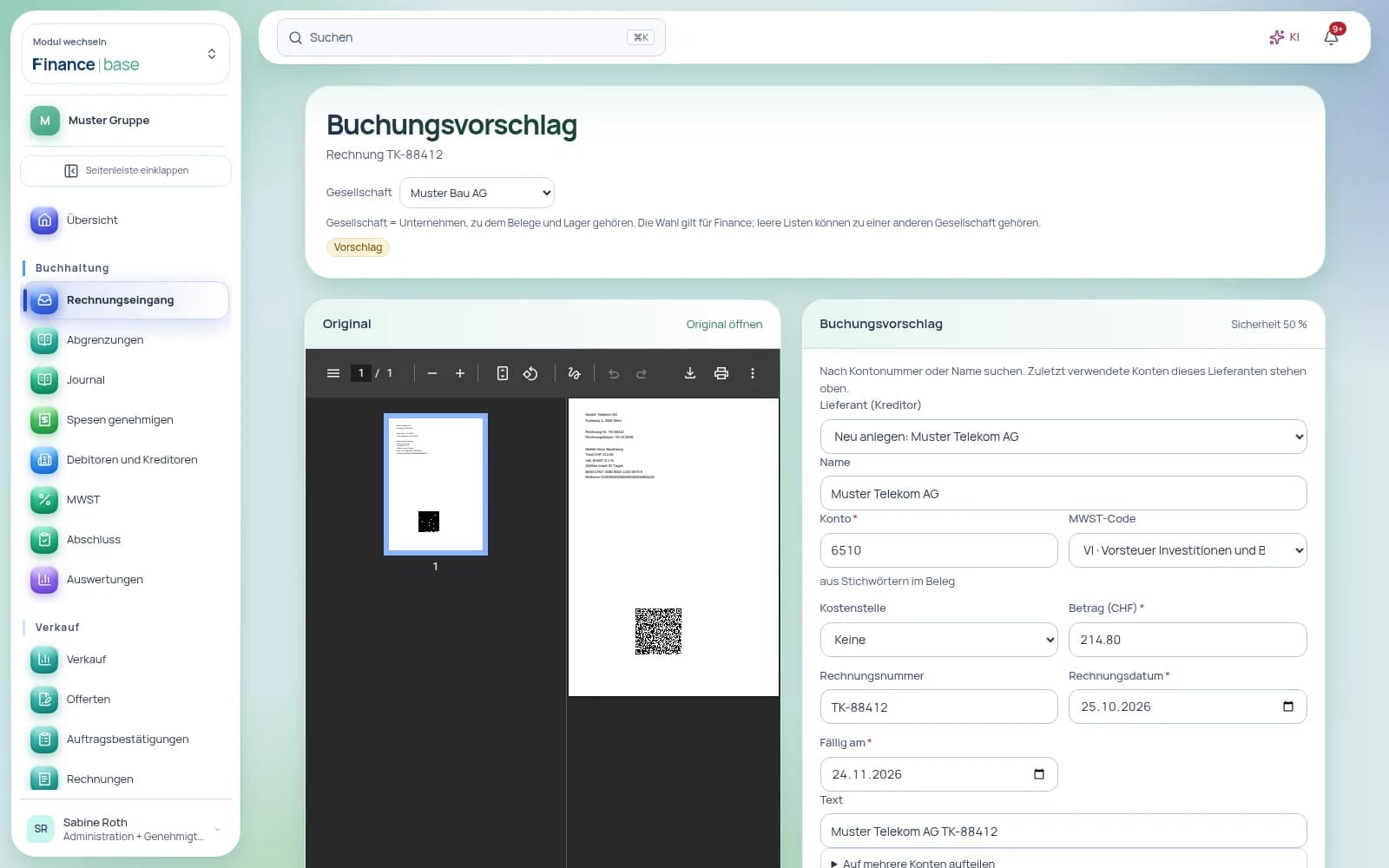
Email the invoice to your Finance address or snap it with the app. Finance reads the QR code and the text, proposes the posting, and you confirm with “OK” or “Always post like this”. If you wish, a rule then posts it for you from now on.
“Writing invoices, generating the QR payment part somewhere else, ticking off payments by hand?”
Solution
Every invoice is created as a PDF with a Swiss QR payment part. Upload your bank statement and the payments match themselves to the right invoice by reference.
“Your fiduciary gets a binder at year-end and emails the questions back?”
Solution
Your fiduciary works directly in Finance with their own access – viewing, posting, exporting – and you can revoke that access at any time. You export the journal and trial balance as CSV, Excel or text.
“Customers ask for invoice copies, pay late, and you chase them by hand?”
Solution
Customer portal with your logo and colour, open balances and documents; accept quotes, optionally with a signature. Customers pay online in the customer portal with PayPal or, with a configured payment service and your company’s corresponding contract, by card or TWINT. Each payment is posted once. The QR invoice on the document is used for e-banking transfers.
QR invoice, VAT return by FTA form box with eCH-0217 file, camt and pain.001 bank files, and chart-of-accounts templates for SMEs, sole proprietorships and associations – including simple bookkeeping under Art. 957 CO for small businesses.
02
Accounting, sales and payroll on one base.
Invoices from sales, expenses from the app and the payroll journal from HR | base land in the same journal without retyping – the payroll journal aggregated, with no names or individual salaries.
03
Incoming invoices that learn as you go.
QR code, PDF text, text recognition and, on request, AI fill in the posting proposal; every confirmation becomes a rule that posts on its own from then on – up to an amount limit.
Free data migration
Switch without the effort – we transfer your data
Free data migration by KMU | base, within 24 hours on working days. When you commission data migration by KMU | base, the paid subscription and minimum term start immediately; this ends the free month. Upload your data securely through your dashboard under Settings › Data migration.
you check the month, quarter, half-year or financial year with a checklist per company, give reasons for open items and lock the period for good.
Service reports
jobs in the duty roster, report with time, spare parts and flat rates, photo and customer signature, PDF straight away – on the web and in the app, even without a signal. The office approves and invoices in bulk.
Invoice, quote and reminder by post
after the address and the confirmed price are checked, documents go out as a letter, with a cover letter if you wish. You pay with prepaid credit or on the next monthly invoice.
Four-eyes per company
you set approvals and payment routes centrally, with exceptions per company. People with sole signing authority approve on their own; the exception is logged.
Cash discount and reminder preview
cash discount on customer and supplier invoices, with write-off and input tax correction. Before sending a reminder you see the level, fee, new deadline and recipient.
Partial, down-payment and final invoices
you invoice an order by quantity, as a percentage down payment or as a final invoice that deducts the down payments; pro forma invoices do not count as revenue.
Invoice without a QR payment part
without a Swiss bank account you issue invoices with bank transfer (IBAN and BIC from any country) or with PayPal only.
Chart-of-accounts templates
During setup you pick one of six templates – SME, sole proprietorship or association, with or without VAT.
Simple bookkeeping
Sole proprietorships and associations record income and expenditure; the offsetting entry is created automatically.
Customer area with own password
Your customers see invoices and quotes in their own area with your logo and sign in with their own password.
Pay with PayPal in the customer area
Customers pay online in the customer portal with PayPal or, with a configured payment service and your company’s corresponding contract, by card or TWINT. Each payment is posted once. The QR invoice on the document is used for e-banking transfers.
Invoices in USD
Documents, subscriptions and customers are available in CHF, EUR and USD; amounts in different currencies are never added together.
Bank statement as CSV
Alongside camt files, you can also import statements from online accounts as CSV; payments find their invoice on their own.
A complete app
No plugins. No modules.
Everything included.
Finance | base is a complete app – not a basic package that you first have to put together with paid extra modules. All 14 areas with 159 features, the AI and all updates are included in the price.
Common practice: the building-block model
A basic package – plus an extra module, a plugin or an add-on with its own price for every further area.
Basic packageExtra cost
Extra moduleExtra cost
Extra moduleExtra cost
PluginExtra cost
Add-onExtra cost
AI at extra costExtra cost
Many building blocks. Many prices.
With Finance | base: one complete app
All 14 areas
159 features
AI included
All updates included
Sales: from quote to invoice
Item master
Stock
Purchasing, bank and expenses
Projects
Service reports and service orders
Production
Budget and liquidity
Accounting
VAT return
Closing and reports
Incoming invoices
Receivables and open items
Working with your fiduciary
One app. One login. Everything included.
inancebase
Areas in one app
1414
Features included
159159
Extra modules needed
00
AI at no extra cost
incl.incl.
Complete ERP
Everything an SME ERP needs.
Without add-on modules.
Finance | base is a complete ERP, not just accounting. Items, sales, purchasing, inventory, production, projects and service reports run in the same app as the general ledger and VAT – every delivery, every invoice and every valuation posts itself.
Items, variants and price lists
Item master with variants by size or colour, GTIN/EAN and named price lists per customer or group.
Quote → order → delivery note → invoice
The whole sales chain with QR invoices, partial returns and a backorder list.
Purchasing and planning
Purchase orders, order proposals below minimum stock, goods receipt including partial deliveries.
Inventory with scanning
Barcode and QR in the browser, with a handheld scanner or in the app: goods receipt, picking, transfers.
Batches, best-before dates and serial numbers
Traceable from supplier to customer, issued by the earliest expiry date.
Stocktaking and valuation
Counts per location at a reference date, valuation by FIFO, moving average or standard price; differences and the change in inventory post when you close.
Bills of materials and production
Multi-level bills of materials with operations, production costs and production orders.
Service reports on the go
Orders in the shift plan, working time, travel time, spare parts from stock and flat fees recorded on site, customer signature, report PDF and consolidated invoice.
Accounting included
General ledger, VAT, bank and closing – sales and inventory post directly.
Features
Everything this app includes.
Finance | base is the ERP for Swiss SMEs: sales, stock, purchasing, projects, service reports and accounting in one app – from quote to QR invoice, from storage location to stocktake, from purchase order to payment run and from project hour to invoice. You keep your books with one of six chart-of-accounts templates or as simple bookkeeping, with VAT returns and year-end closing under the CO – and your fiduciary works right alongside you.
Sales: from quote to invoiceQuote, order, delivery note and invoice in one chain – with QR invoices, recurring billing, subscriptions, incoming payments and dunning.21 features
Finance | base handles all of your sales per company: the quote becomes an order, then a delivery note or picking list and finally the invoice with Swiss QR payment part. Recurring billing and subscriptions invoice repeat services, payments from the bank file are matched by reference, and dunning suggests the next level.
All features
Conversion along the chain: quote to order or invoice, order to delivery note, picking list or invoice, delivery note to invoice.
Partial invoice by quantity, deposit invoice as a percentage and final invoice with deposits deducted.
PDF/A documents in German, French, Italian or English and in CHF, EUR or USD; invoices in CHF or EUR include a Swiss QR payment slip with a suitable Swiss bank account.
Invoices without a QR payment part too: with the IBAN and BIC of an account in any country, with free-form account details or with PayPal only.
Templates with logo, accent colour, address window on the left or right and header and footer texts per language.
Sending by email immediately or scheduled in the customer’s local time, bulk sending and a sending log.
After review and approval, you send invoices via eBill through your own Pingen account straight to your customers’ e-banking and explicitly choose letter delivery as a fallback when needed.
Customer portal with your logo and colour, open balances and documents; accept quotes, optionally with a signature. Customers pay online in the customer portal with PayPal or, with a configured payment service and your company’s corresponding contract, by card or TWINT. Each payment is posted once. The QR invoice on the document is used for e-banking transfers.
Recurring billing for invoices and orders, weekly to yearly, sent automatically or as a draft for review.
Subscriptions with plans, seats, trial period, payment links and promo codes.
Read camt.053 and camt.054 bank files: QR and RF references are matched automatically, part payments stay visible.
Dunning with payment reminder, 1st and 2nd reminder, deadlines, optional fees and optional default interest; before a reminder is sent, the preview shows level, fee, new deadline and recipient. Dunning runs and a dunning block per customer.
Partial returns: take back individual lines and quantities with a credit note and booking back into stock; the backorder list shows what is still to be delivered from open orders.
Cash discount on customer and supplier invoices: discount terms on the document, payment with the discount posted and VAT corrected.
Pro forma invoices: without posting and without revenue, converted into a normal invoice if needed.
Order confirmation created automatically when a quote is accepted, set per company as a draft or issued directly; the chain through to the invoice also works without Sales | base.
Link quotes to deals from Sales | base.
Reverse a wrongly recorded manual payment with a reason; the receivable becomes open again.
Create recurring invoices directly from the customer, with a pre-filled series.
Invoice, quote or reminder by post: you check the detected address and the confirmed price, add a cover letter if you wish and record the handover to the post; you pay with prepaid credit or on the next monthly invoice.
What your customers do in the customer area (acceptance, payment, document, change of address) shows up in the bell and under “To do”; the history is on the document.
Your benefits
Nothing entered twice. Each follow-on document takes over customer and lines; the linked documents are shown on the document.
Never over-invoiced. An invoice from an order contains only the quantities still open for invoicing.
Payments match themselves. Payments with a QR or RF reference from the bank file are allocated to the right invoice automatically.
Roles and permissions
View documents, customers and items: people with the “View” level in the “Finance: sales” area.
Create and send quotes, orders and invoices, record payments and send reminders: people with the “Edit” level.
Manage templates, email texts, bank accounts, number ranges and customer groups: people with the “Manage” level.
Do the invoices carry a QR payment part?+
Yes, with a Swiss bank account: invoices and reminders carry the Swiss QR payment part with receipt – with QR-IBAN and QR reference or with IBAN and RF reference. Without a Swiss account you can also invoice without QR: with the IBAN and BIC of any country, with free-form account details or with PayPal only; the document then shows the payment details.
Can the customer pay online?+
Customers pay online in the customer portal with PayPal or, with a configured payment service and your company’s corresponding contract, by card or TWINT. Each payment is posted once. The QR invoice on the document is used for e-banking transfers.
How does recurring billing work?+
A recurring series creates exactly one document per period – issued and sent automatically or as a draft for review. A paused series does not invoice the paused period afterwards.
Item masterProducts and services with price, unit, VAT code and revenue account – entered once, ready in every document.16 features
In the item master you manage products and services per company: item number, description, list price per unit, VAT code, category and revenue account. For individual customers you store their own prices, discounts and item numbers; when you pick the item in a document, Finance | base fills in the right price.
All features
Type “Product” or “Service” with item number, description and details.
List price per unit excluding VAT, with units such as hrs, pcs or flat rate.
VAT code per item: standard rate, reduced rate, accommodation, zero-rated or exempt.
Category, revenue account and purchase price per item.
Customer prices with discount and the customer’s item number; the customer price takes precedence over the list price.
Custom fields for items: text, number, date or selection.
Import with the import assistant from CSV or Excel files.
Search by number, description or category; inactive items are kept but no longer appear in new documents.
Products can optionally be kept in stock and combined into sets of several items.
Variants from attributes such as size and colour – each with its own number, stock and price, master data taken from the main item.
Tiered prices by quantity and customer: customer price, price list, tier, then list price – visible on the document and calculated bindingly when saved.
Monthly, quarterly and yearly prices on the item; the document and the series suggest the matching price.
Discount as a percentage or a fixed amount, document total rounded to 5 cents.
Margin on the item and on the document line, only for people with the right to manage, and never in the PDF or the customer area.
Sales reports with CSV export; custom units.
Change items in the AI assistant – as always only after your approval.
Your benefits
Enter once. Quotes, orders, invoices and recurring billing all draw on the same items.
The right price for every customer. A customer price takes precedence over the list price, and the customer discount is added per line.
Lines without retyping. The line takes description, unit, price and VAT code from the item.
Roles and permissions
View items and customer prices: people with the “View” level in the “Finance: sales” area.
Pick items in documents: people with the “Edit” level.
Maintain items, customer prices and custom fields: people with the “Manage” level.
Can we bring over our existing items?+
Yes. With the import assistant you take over item number, description, price and status from a CSV or Excel file.
Do customer prices apply automatically?+
Yes. When you pick an item in a document, Finance | base fills in the stored customer price and customer discount; without a customer price, the list price applies.
StockStock by warehouse and bin, reservations, picking and inventory counts; valuation by moving average, FIFO or standard cost.12 features
Finance | base keeps the stock of your products at several locations – warehouses, branches or vehicles – with their bins. Orders reserve stock, delivery notes and invoices book the issue themselves, at most once per order line. Every change is a movement with its source.
All features
Several locations with address and bins; each new location gets the bin “HAUPT”.
Stock keeping per product with minimum stock, target stock, minimum order quantity, supplier, lead time and default bin.
Stock list with on hand, reserved, available and stock value at moving average cost; items below minimum stock are flagged.
Movements: receipt with cost price, issue, transfer between bins, correction and stocktake – traceable per item with their source.
Orders reserve; delivery notes and invoices book the issue when issued, and a cancellation credit note reverses it.
Picking: one pick sheet per issued picking list, sorted by bin, with actual quantities, ready to print.
Stocktaking per location with count sheet and reference date; differences are booked on closing.
Sets of several items: reservation, pick sheet and issue run through the components.
Replenishment with order proposals for items whose available stock falls below minimum stock.
Stock valuation by moving average, FIFO or standard price, stock value at a reference date and the change in inventory posted at closing with one click.
Inventory analyses: ABC classes by consumption value, turnover and coverage per item, plus slow movers with the stock value they tie up.
Blind count in the stocktake: whoever counts sees neither the target nor the difference; review and closing need the “Manage stock” right.
Your benefits
Available, not just on hand. Available stock deducts the reservations of open orders.
No double issues. Delivery note, picking list and invoice for the same order never issue more than the ordered quantity in total.
Reorder in time. Replenishment proposes items below minimum stock with a quantity up to target stock.
Roles and permissions
View stock, movements and order proposals: people with the “View” level in the “Finance: sales” area.
Book movements, pick, take stock and run replenishment: people with the “Edit” level.
Set up locations, bins, stock keeping and sets: people with the “Manage” level.
How is the stock value calculated?+
Choose moving average, FIFO or standard cost per item. Receipts update the average cost; FIFO values remaining stock from the most recent receipt layers; standard cost uses the stored price. Valuation at a reference date shows quantity, unit cost and stock value.
Do we have to book deliveries out by hand?+
No. Delivery notes and invoices book the issue when issued, picking lists when picking is completed – at most once per order line.
What happens to stocktake differences?+
On closing, Finance | base books each difference as a stocktake movement. The stock at the time of closing is decisive; lines not counted stay unchanged.
Purchasing, bank and expensesPurchase orders, recurring expenses, approval and payment runs, bank reconciliation with camt files and expenses with approval.12 features
In purchasing you enter purchase orders with suppliers and convert them into the supplier invoice – with a warning if the invoiced amount differs. Recurring expenses become supplier invoices, the payment run creates the pain.001 file, and bank reconciliation matches the transactions from camt files. Employees submit their expenses; approval lies with their line manager or accounting.
All features
Purchase orders with lines, delivery date and status: draft, ordered, partly delivered, delivered, invoiced or cancelled.
Conversion into the supplier invoice as an open payables item, with a warning if it differs from the purchase order.
Recurring expenses monthly, quarterly, half-yearly or yearly; due supplier invoices are created at the click of a button.
Approval of supplier invoices before payment, blocking with a reason and four-eyes principle that can be set per company: one central default with exceptions per company. Anyone with sole authority approves alone; the exception is logged.
Payment run: select due, approved items, approve and create the pain.001 file; it is kept in the archive.
Bank reconciliation with camt.053 and camt.054 files; each transaction is taken over only once.
Proposals by reference, document number, IBAN, name and amount, including part and bulk payments, with a confidence percentage.
Rules based on the booking text with offsetting account, posted automatically if you wish.
Expenses with a receipt as PDF or photo, eight categories, foreign currency with exchange rate and VAT rate; without a receipt up to an adjustable amount.
Approval by the line manager or accounting, posting as an open item for the payment run and an expense report per person, category and month.
Requests and tickets to teams such as IT, HR, finance, QMS or facilities – across all apps, with queues, due dates and conversion into tasks.
Expenses can be paid out with the salary; expense decisions send a notification to the person who submitted them.
Your benefits
Order and invoice in line. If the invoiced amount differs from the purchase order by more than CHF 5 or 2 %, Finance | base flags it before posting.
Pay with approval. Supplier invoices are approved before payment, and above a set amount under the four-eyes principle if you wish.
Reconcile instead of retyping. Transactions from camt files receive proposals against open items; where reference and amount match, they are reconciled automatically.
Roles and permissions
Submit expenses: everyone with a role once Finance | base is booked; approve: the line manager or people with the “Post” right – never their own claim.
Purchase orders, recurring expenses, approvals, payment runs, bank reconciliation and posting expenses: people with the “Post” right.
Set the approval requirement, the four-eyes threshold and expenses without receipt: people with the “Settings” right.
How does the payment reach the bank?+
Finance | base creates a pain.001 file from the approved payment run, which you upload to your e-banking; a copy is kept in the archive.
Which bank files does Finance | base read?+
camt.053 and camt.054. Each transaction is taken over only once, even if you read in the same file twice.
Who approves expenses?+
The line manager or accounting. A person’s own expenses are always approved and posted by someone else.
ProjectsProjects with customer, budget, tasks, milestones and hourly rates – invoice hours and fixed prices directly.10 features
Finance | base manages projects per company with customer, budget in hours or CHF and a billing method: time and materials, fixed price or internal. You plan tasks on a board, milestones structure the project, and open hours become a draft invoice – never twice. With HR | base, the hours come straight from time recording.
All features
Projects with number, customer, cost centre, status and billing by time and materials, fixed price or internal.
Budget in hours or CHF with the share already invoiced.
Task board with the columns Open, In progress, Review and Done; tasks with due date, estimate, labels and assignee.
Tasks optionally shown in the customer portal; the customer marks tasks awaiting their action as done.
Milestones with due date and amount; for fixed-price projects a draft invoice in one click.
Activities such as consulting or installation, each with a service item, for all projects.
Hourly rates per person, per activity or both, valid from a date.
Time recording in the project, with task, activity and a “Billable” flag.
With HR | base: project hours from time recording clock-ins, evaluated up to yesterday.
Invoicing hours: draft invoice to the project customer, rounded up to the quarter hour, per person, per day or as a total.
Your benefits
Budget in view. Invoiced hours and amounts appear as a percentage of the budget.
Every hour invoiced once. Invoiced time is closed; if the invoice is cancelled, it becomes open again.
The right rate. The most specific rule wins: person and activity before person before activity before the standard rate.
Roles and permissions
View projects, tasks and key figures: people with the “View” level in the “Finance: sales” area.
Edit tasks, record time, maintain milestones and invoice: people with the “Edit” level.
Create projects, maintain hourly rates and activities: people with the “Manage” level.
Do we have to record hours twice?+
No. With HR | base, employees clock in to the project and Finance | base takes over the hours. Without HR | base, you record the time directly in the project.
Can the customer see the project status?+
Yes, if you want: tasks set to “Show in customer portal” are visible with title, status and due date; the customer marks tasks awaiting their action as done there.
How do we invoice fixed-price projects?+
You store milestones with an amount and invoice each milestone in one click as a draft invoice to the project customer.
Service reports and service ordersPlan service orders and see them on the roster, record the service report on site, have the customer sign it and invoice in one go.14 features
The service report is part of the ERP in Finance | base: service orders, reports, projects, item master, stock and invoices run in one app. The office plans the service order, and it appears on the staff roster. On site, staff record working time, travel time, kilometres, spare parts, flat fees and photos – even without a network –, the customer signs on the device, and approved reports become the invoice.
All features
Service orders in the ERP with number, customer or project, date (also over several days), place of work, contact person and description; assignment to one or more people.
Assigned service orders appear on the staff roster, also in the app; planning shows conflicts with absences and other jobs as a warning.
“My orders” for staff, who set the status themselves: in progress, done.
Own orders: staff can also create an order themselves, on the web and in the app; the office checks it and assigns customer and project before it is invoiced.
Report for a service order, a project or a customer; your company sets whether the signature is mandatory, whether material is drawn from stock and how travel time and kilometres are invoiced.
Report with working time per activity, travel time, kilometres, description of the work, internal note and photos.
Spare parts and material from the item master or as free text – delivered, installed, replaced or used up –, drawn from the vehicle or storage location and, for tracked items, with serial number or batch.
Flat fees as a separate block, with fixed prices from the item master.
Recording in the KMU | base app, even without a network; the data is sent once the connection is back.
Customer signature on the device with name and time; without a signature only with a reason, if you allow it.
Report PDF in letter style; the signed version stays unchanged and, if you like, is emailed to the customer.
Approval by the office, rejection with a reason; corrections after closing appear in the log, stock differences are posted afterwards.
“To invoice”: approved reports per customer and order, as a single or combined invoice with the report PDFs attached.
In the AI chat you ask about your own jobs and have a report draft prepared; it is saved only after you confirm.
Your benefits
No paper in the vehicle. The report is created at the customer’s and reaches the office straight away.
Recorded once, invoiced correctly. Hours, travel time, kilometres, spare parts and flat fees become an invoice draft – never twice.
Traceable and booked against stock. The signed version stays unchanged, every correction is logged with its reason, spare parts are drawn from stock.
Roles and permissions
Record your own orders and reports: people with the “Record reports” right, e.g. with the role template “Service on the go”.
See and schedule all orders and reports: “All reports” right.
Approve, correct and invoice: the “Approve reports” and “Invoice reports” rights.
Does the service report work without a network?+
Yes. In the KMU | base app you record service orders and reports even without a connection; the data is sent as soon as the device is back online.
Does the customer have to sign?+
By default yes, on the device. If you allow it in the settings, a report can also be closed without a signature – then with a reason.
How does a service order get onto the roster?+
As soon as you assign a service order to people, it appears on their roster. If you change the date or the people, the roster adjusts.
What happens to stock?+
Spare parts with a storage location are drawn from stock when the report is closed, for tracked items with serial number or batch. If stock is not sufficient, the report still closes, and the office posts the difference when approving.
ProductionBills of materials, operations and production orders in one app.3 features
Bills of materials, operations and production orders in one app.
All features
Multi-level bills of materials with operations and manufacturing costs from materials and labour.
Production orders with material consumption and completion into stock at actual cost.
Sub-orders for missing assemblies and production suggestions based on minimum stock.
Your benefits
Production Bills of materials, operations and production orders in one app.
Budget and liquidityPlan monthly budgets and expected cash flows.3 features
Plan monthly budgets and expected cash flows.
All features
Record monthly budgets by account, cost centre or project.
Weekly liquidity forecast using open receivables, recurring invoices and scheduled payments.
Record one-off or recurring payments and an opening balance.
Your benefits
Budget and liquidity Plan monthly budgets and expected cash flows.
AccountingAccounting under Swiss law: six chart-of-accounts templates, simple bookkeeping, a complete journal, cost centres and foreign currencies.16 features
Finance | base comes with six chart-of-accounts templates with account names in four languages – for SMEs, sole proprietorships, associations and micro businesses, also as simple income-and-expenditure bookkeeping – and keeps a consecutively numbered journal for each company. A posting is never changed or deleted, only reversed. A hash chain makes any later alteration visible.
All features
Six chart-of-accounts templates – SME with or without VAT, sole proprietorship with or without VAT, association, micro business – with account names in German, French, Italian and English, adaptable per company.
Import your own chart of accounts as CSV or Excel, with a trial run and an error report per line; export in the same format.
Simple bookkeeping under Art. 957 para. 2 CO for sole proprietorships, associations and micro businesses: income, expenditure and transfers between cash and bank with category and receipt; the offsetting entry is created automatically.
Consecutively numbered journal for each company, linked to the receipt.
Compound postings with any number of debit and credit lines; the totals must match.
Reversal instead of editing: postings are never overwritten or deleted.
Hash chain across the journal, designed to meet the requirements of the GeBüV (Swiss accounting records ordinance), with a check on the journal page.
Account ledger with opening and closing balance, plus trial balance.
Cost centres for each company with result by cost centre.
Foreign currency postings with an entered exchange rate and presentation in CHF under CO Art. 958d.
Several companies in one account, and cash count with difference posting.
Accruals and deferrals for transitory assets and liabilities with automatic reversal in the following period; they can be cancelled.
Exchange rate and CHF equivalent directly on the sales document.
Monthly budgets by account, cost centre or project; actual comparison for accounts and projects.
Cash flow forecast with expected receipts and payments.
Retrieve pain.002 status reports for submitted payment files through the configured bank connection; submission and execution remain separate states.
Your benefits
Ready from day one. Six chart-of-accounts templates with explanation and preview; you adapt the one you choose or import your own chart of accounts as CSV or Excel.
Traceable to the receipt. Every posting has a consecutive number and links to its receipt.
Unchanged since posting. Corrections are made by reversal, and the hash chain check is shown right on the journal page.
Roles and permissions
View: everyone with access to Finance | base.
Post: people with the “Post” right, for example via the “Accounting” or “Fiduciary” role templates.
Set up accounts and cost centres: people with the “Settings” right.
You define each person’s data scope – limited to specific companies if you wish.
How do I correct a wrong posting?+
With a reversal and a new, correct posting. The original posting remains visible and the journal stays complete.
How do I post invoices in euros?+
You post in the foreign currency and enter the exchange rate yourself; Finance | base presents the amount in CHF, as CO Art. 958d requires.
VAT returnPrepare VAT by form box and produce eCH-0217 XML ready to upload to the FTA portal.10 features
Finance | base knows your VAT status for each company – effective method or net tax rate, agreed or received consideration. Your postings produce the return by form box, reconciled against what was posted and ready as eCH-0217 XML to upload to the FTA portal.
All features
VAT status for each company from a chosen date: registered or not, VAT number with UID check digit validation.
Effective method or net tax rate, agreed or received consideration, reporting period.
VAT rates with validity dates: each period uses the rates that applied at the time.
VAT codes for output tax, input tax and acquisition tax.
VAT journal with all tax-relevant postings for the period.
Return by FTA form box with posted-versus-form reconciliation.
eCH-0217 XML validated against the XSD schema, ready to upload to the FTA portal; a copy stays in the archive.
Period closing with a balancing posting.
Corrective return as the difference from the original return.
Display of the 60-day deadline.
Your benefits
Return built from postings. The VAT codes on each posting fill the form boxes; you retype nothing.
Reconciled, not estimated. The reconciliation sets posted tax against form values before you close.
Deadline in view. The 60-day deadline for the period is shown in Finance | base.
Roles and permissions
View the return and VAT journal: everyone with access to Finance | base.
Maintain VAT status and rates: people with the “Settings” right.
Close periods: people with the “Close” right, for example via the “Accounting” role template.
How does the return reach the FTA?+
Finance | base produces the eCH-0217 XML file. You upload it to the FTA portal and stay fully in control; the file remains in the archive.
Does it work with the net tax rate method?+
Yes. For each company you choose the effective method or the net tax rate, each from a chosen date.
What if I find a mistake after closing?+
You create a corrective return; Finance | base shows only the difference from the original return.
Closing and reportsFixed asset register with straight-line or declining-balance depreciation and disposal; plus guided closing, balance sheet and income statement.18 features
Closing guides you through a checklist per company: review the month, quarter, half-year or financial year, give reasons for open items, lock the period with an unchangeable log. Locked periods stay as they are, and balances are carried forward at year-end. The balance sheet and income statement follow the structure of CO Art. 959a and 959b, with the prior year alongside.
All features
Locking and finalising months.
Year-end closing with balances carried forward to the new year.
Closing trial balance archived as a receipt.
Opening balance sheet from the previous system via CSV – archived and logged.
Balance sheet under CO Art. 959a with prior-year comparison.
Income statement under CO Art. 959b with prior-year comparison.
Financial overview with cash, result, open and overdue receivables, payables due and VAT deadline.
Export of journal and trial balance as CSV, Excel or tab-delimited text.
Guided interim and year-end closing: checklist per company for the month, quarter, half-year or financial year, open items with a reason, locking with an unchangeable log.
Interim report with prior period, prior year, budget and key figures as a PDF on letterhead or as CSV; when the period is locked, it is archived unchanged.
Reports also for any reporting date; the fiduciary’s comments stay separate.
Accrual and deferral suggestions from service periods and recurring invoices: you confirm, and the reversal on the day after the reporting date happens automatically.
Depreciation per quarter or month; amounts already posted are deducted, and only the remainder is left at year-end.
Fixed asset register with number, acquisition date, cost and residual value, asset and expense accounts and cost centre.
Straight-line depreciation over the useful life or declining-balance depreciation with a rate and a schedule for the coming years.
View acquisition cost, posted depreciation and carrying amount for each asset.
Post the remaining annual depreciation as a collective entry, taking amounts already posted into account.
Post asset disposal or sale with carrying amount, proceeds and gain or loss.
Your benefits
Clear figures. Finalised months accept no further postings; the figures you presented remain valid.
Structured under the CO. Balance sheet and income statement follow CO Art. 959a and 959b and show the prior year for comparison.
Your position at a glance. The overview shows cash, result, open and overdue receivables, payables due and the VAT deadline.
Roles and permissions
View reports and overview: everyone with access to Finance | base.
Lock months and run the year-end closing: people with the “Close” right.
Export journal and trial balance: people with the “Export” right, for example via the “Fiduciary” role template.
How do we start mid-year?+
You import the opening balance sheet from your previous system as CSV. The file is archived and the import logged.
Can I still post in a locked month?+
No. A finalised month accepts no further postings; you post corrections in an open period.
Incoming invoicesUpload or email supplier invoices: Finance | base reads the QR code and proposes the posting.10 features
Supplier invoices arrive by upload, scan or email to your own inbound address. Finance | base reads the Swiss QR code and the PDF text, detects duplicates and proposes supplier, account, VAT code and due date. You confirm and pay with a payment file for your e-banking.
All features
Intake by upload or scan with file type check from content and virus scan; the original goes straight into the archive, built to the requirements of the GeBüV.
Your own inbound address on financebase.ch, the Finance | base domain. Find the exact address in invoice inbox settings; duplicate invoices create a single entry.
Swiss QR code reading – from image, vector graphic or photo – with validation of IBAN, reference and SCOR reference.
PDF text extraction: IBAN, reference, amount, invoice number, date, payment terms, UID and VAT rates – without AI and without any outside connection.
Posting proposal with supplier, account, VAT code, cost centre and due date, plus a confidence percentage.
“OK”, “Always post like this” or “Change”: rules per supplier, automatic up to an amount limit if you wish; Finance | base learns from your decisions.
Rules with a distinguishing feature and split across several accounts when a supplier invoices different things.
Duplicate detection by file, reference and amount, invoice number, and supplier, amount and date.
AI account assignment proposal at the click of a button – only when you ask for it.
pain.001 payment file for your e-banking from open payables; accounts payable ledger with payment recording.
Your benefits
Less typing. IBAN, reference, amount, invoice number, date and payment terms come from the QR code and PDF text – without AI and without any outside connection.
Decide once. With “Always post like this” you set a rule per supplier, automatic up to an amount limit if you wish.
No invoice twice. Duplicate detection compares file, reference and amount, invoice number, and supplier, amount and date.
Roles and permissions
Capture invoices, confirm proposals and create payment files: people with the “Post” right.
Maintain suppliers and basic settings: people with the “Settings” right.
Does reading invoices require AI?+
No. Finance | base reads the QR code and PDF text without AI and without any outside connection. You request the AI account assignment proposal only when needed, at the click of a button.
How do we pay the invoices?+
Finance | base creates a pain.001 payment file from open payables. You load it into your e-banking and authorise the payment there.
What if a supplier invoices different things?+
A rule can be tied to a distinguishing feature and split the amount across several accounts.
Receivables and open itemsOpen items per customer, part payments and ageing analysis: see what is outstanding and for how long.7 features
Finance | base keeps open items for each customer and takes part payments into account. The ageing analysis sorts every amount by due date, and the account statement shows a customer’s or supplier’s transactions on screen.
All features
Open items per customer.
Part payments with visible remaining balance.
Ageing analysis: not due, 1–30, 31–60, 61–90 and over 90 days.
Account statement per customer on screen.
Account statement per supplier on screen.
Open and overdue receivables in the financial overview.
Write off a final bad debt on an outstanding CHF invoice with a reason and journal entry.
Your benefits
Liquidity under control. You see what is not due and what has been outstanding for 1–30, 31–60, 61–90 or more than 90 days.
Part payments properly allocated. Each part payment reduces the open item, and the remaining balance stays visible.
Answers without searching. The account statement per customer or supplier answers queries right on screen.
Roles and permissions
View open items, ageing analysis and account statements: everyone with access to Finance | base.
Record payments: people with the “Post” right.
Are part payments taken into account?+
Yes. Each part payment reduces the open item; the remaining balance stays visible in the ageing analysis.
Working with your fiduciaryYour accountant reads, posts and exports directly. All user accounts are included in employee-based pricing.7 features
The accountant role template provides the required read, posting and export permissions. All user accounts are included. Pricing is based on employees and subscribed apps.
All features
“Fiduciary” role template with view, post and export.
Accounts can be marked as accountant access.
All user accounts are included. Pricing is based on employees and subscribed apps.
Accountants and invoice entry staff work with their assigned permissions.
Export of journal and trial balance as CSV, Excel or tab-delimited text.
Data scope can be limited to specific companies.
Single sign-in; interface and emails in German, French, Italian or English.
Your benefits
One shared record. Fiduciary and management work in the same journal; receipts and postings are in one place.
Free access. All user accounts are included. Pricing is based on employees and subscribed apps.
Data in the right format. Journal and trial balance are available as CSV, Excel or tab-delimited text.
Roles and permissions
The “Fiduciary” role template covers view, post and export.
Locking months and year-end closing: people with the “Close” right – you decide whether your fiduciary gets it.
With the “Specific companies” data scope, the fiduciary sees only the companies you release.
Does our fiduciary’s access cost anything?+
All user accounts are included. Pricing is based on employees and subscribed apps.
In which formats does the fiduciary receive the data?+
Journal and trial balance as CSV, Excel or tab-delimited text – straight from Finance | base.
Working together
One workflow across all apps.
When you subscribe to several apps, your business functions connect. Shared users, roles and permissions determine access.
HR | base
Import the payroll journal aggregated by wage type, account and cost centre. Billable project hours from HR time tracking become invoice line items.
Docu | base
Invoices and supporting documents are stored in the shared archive core. With Docu | base, authorised users can also find them through general document filing and search.
QMS | base
Supplier evaluations and accounts payable use the same contact. Complaints in QMS | base can trigger a credit note in Finance | base.
One login. Four languages. Data in Switzerland.
Work in German, French, Italian or English. The shared platform is hosted in Swiss data centres.
Employee app
In the employee app: scan inventory, photograph supplier invoices, receipts and expenses by photo.
Your price for Finance | base: base price plus app, by employee count. All features, all users, AI and storage are included.
Online base: CHF 49 per month per website – shop included, redesign included. Plus the KMU base base price of CHF 49 per month, charged once (covers all apps together). Website only: CHF 98 per month. You run the shop directly from Finance | base: products, stock, orders and invoices, fully integrated. The shop requires Finance | base. Minimum 12 months. Migration included.
Base priceCHF 49.–User and permission management, access, mobile app, AI and storage for the whole company. Stays the same above 20 employees.
Per appCHF 29.–HR, Finance, QMS, Docu, Sales: your choice, at least one. Price up to 20 employees.
Per app and additional person+CHF 1.–For each person above 20 employees. Below 20, the price for 20 applies.
Included for the whole company: up to 20 employees around 12’500 AI tasks per month (guideline) and 100 GB of storage; per additional person around 200 AI tasks and 2 GB more.
The first month is free, followed by a minimum term of 12 months. Above 1’000 employees, we prepare a quote. Request a quote
Only when you need it
SMS and post at pass-through cost
AI extra pack CHF 25.–, around 5’000 additional AI tasks in the current month
An extra 100 GB of storage for CHF 10.– per month
Sales emails above 10’000 per month: CHF 2.– per 1’000
3 companies included, each additional company CHF 25.– per month
Dedicated server in Switzerland: CHF 390.– per month; included from 1’000 employees with at least 3 apps. Above 1’000 employees, a quote includes a dedicated server with at least 3 apps.
No setup fees, free data migration. When you commission data migration by KMU | base, the paid subscription and minimum term start immediately; this ends the free month.
The first month is free. When you commission data migration by KMU | base, the paid subscription and minimum term start immediately; this ends the free month.
Finance | base is the complete accounting app from KMU | base with ERP functions: QR bill, bank reconciliation, VAT return, incoming invoices with posting suggestions and inventory. Your trustee works with you free of charge, AI is included, and the data stays in Switzerland.
How much does Finance | base cost?+
Finance | base costs CHF 29.– per month for up to 20 employees, plus the base price CHF 49.–, excl. VAT. All users included. The first month is free.
Who is Finance | base for?+
For Swiss SMEs that handle their own accounting, VAT and supplier invoices – on their own or together with their fiduciary. You manage several companies in the same account, each with its own chart of accounts and journal.
Can we take over our existing accounts?+
Yes. During setup you choose one of six chart-of-accounts templates – SME or sole proprietorship, each with or without VAT, association or micro business – or import your existing chart of accounts as a CSV or Excel file with a trial run. The opening balance sheet from your previous system is imported as CSV; the file is archived and the import logged.
How do we file the VAT return?+
Finance | base prepares the return by form box and produces an eCH-0217 XML file validated against the XSD schema. You upload it to the Swiss Federal Tax Administration (FTA) portal; a copy stays in the archive.
Can our fiduciary work directly in the system?+
All user accounts are included. Pricing is based on employees and subscribed apps.
Where does Finance | base use AI?+
Only for the account assignment proposal, and only at the click of a button. Finance | base reads the QR code and PDF text without AI and without any outside connection; you confirm every proposal yourself.
Which languages does Finance | base support?+
The interface and emails are available in German, French, Italian and English, as is the SME chart of accounts. Everyone works in their own language – with a single sign-in for all apps.