First month free

Every document filed audit-proof. Edit Word and Excel right in the browser.

Every version is an immutable archive entry with SHA-256 and a hash chain, plus a template for the procedural documentation under the Ordinance on Accounting Records (GeBüV) and the statutory retention classes. Your auditors verify it themselves with the enclosed script, without our software.

Base price plus appsBase price CHF 49.–, plus CHF 29.– per app per month, up to 20 employees.See prices

The first month is free.

Demo video: Docu | base
Folder tree with access rights and document creation in Docu | base
Just another Monday

What makes us special

  • Filing that learns

    You file similar documents. Docu learns from your choices and handles recurring filing assignments.

    Learn more
  • An archive you can take with you

    You export your archive with a verification tool, so its integrity can be checked independently of our application.

    Learn more
  • PDF in one click

    You save Office documents directly as PDFs. Conversion takes place on Swiss servers.

    Learn more
  • Redact precisely

    You redact sensitive passages in a copy. The affected text is removed from that copy and the original is preserved.

    Learn more
  • Filing project as a checklist

    You plan a filing project as a shared checklist and attach the matching documents from Docu | base directly to the items. In every app.

    Learn more

Need → solution

Need

“Some of it is on the server, some in email, some on someone’s desktop, the rest in a binder in the basement. Nobody finds anything.”

Solution

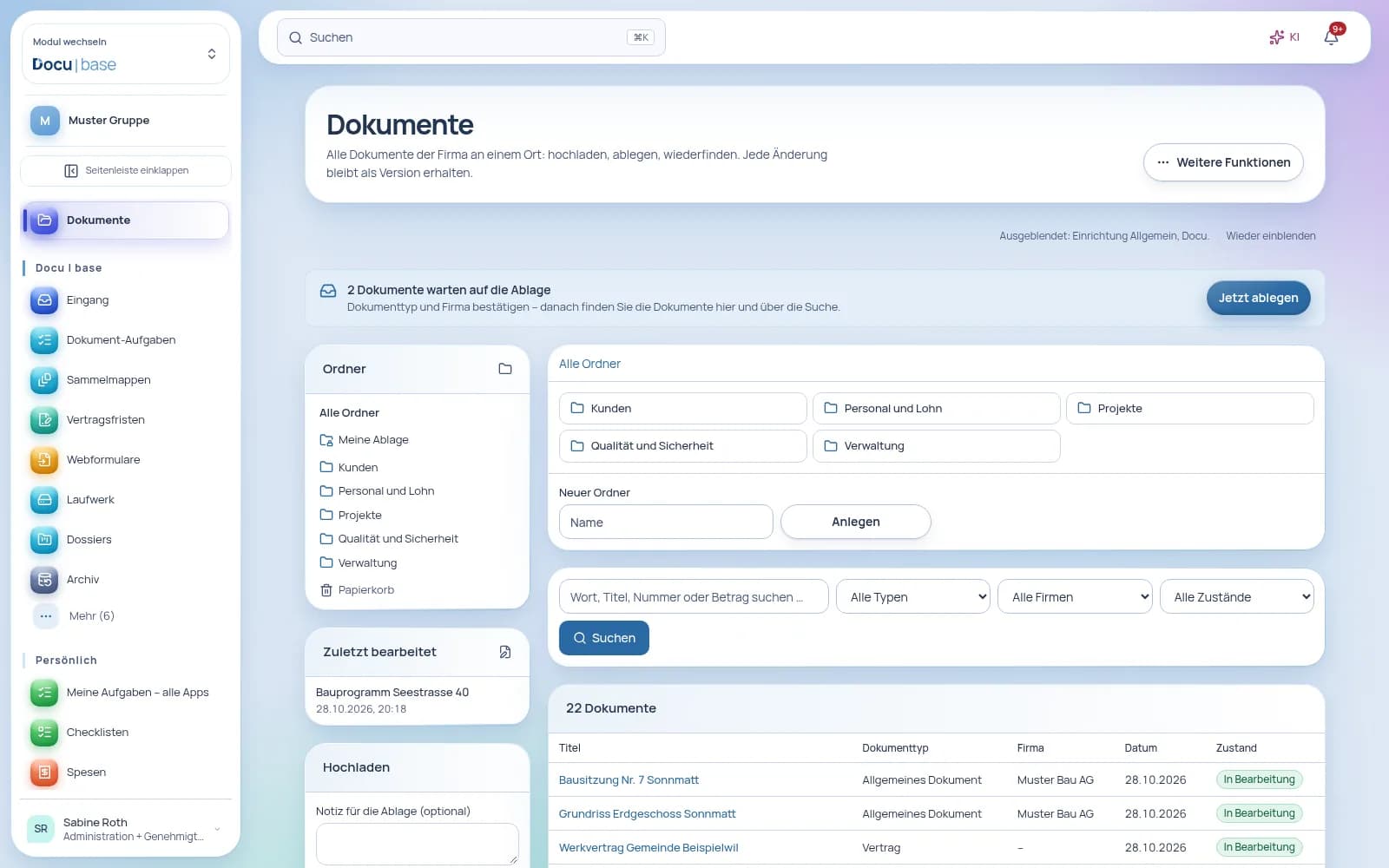
Everything in one place, in real folders just like on your file server, with permissions per folder. Search finds keywords, invoice numbers or IBANs even in scanned paper documents, plus documents from HR, Finance and QMS, as far as you are allowed to see them. Through the network drive, you open the same filing in Finder or File Explorer.

Folder tree with access rights and document creation in Docu | base
Open full-size image (new tab)

Need

“Contract_final_v3_corrected.docx – three people, three versions, and in the end nobody knows which one counts.”

Solution

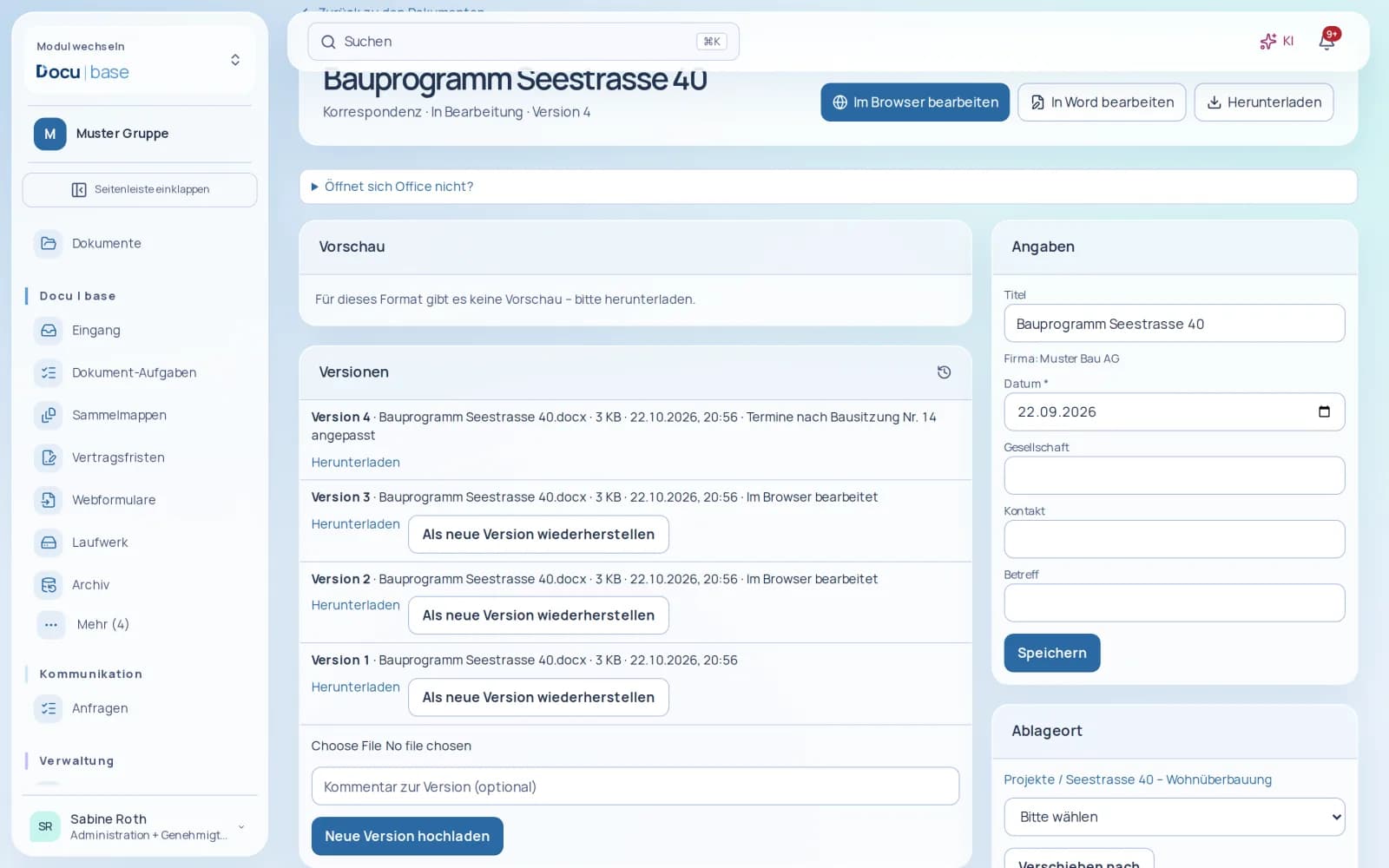
You edit Word, Excel and PowerPoint files right in the browser, even with several people at once. Every save is a new version, and Docu’s permissions apply. Prefer working on the desktop? Open the file there with one click and save it straight back. Instead of an attachment, outside parties get a link with an expiry date, password-protected if you wish.

Document with editing controls and version history in Docu | base
Open full-size image (new tab)

Need

“Keep it for ten years – but from when? And can we finally get rid of the old stuff?”

Solution

Every document has a retention class with a statutory period and legal basis, for example 10 years from the end of the financial year, or 20 years for VAT records on real estate. The retention overview shows what expires next and what can go. Deletion always needs a second person’s approval, and if proceedings arise, you place a legal hold with one click.

Archive with retention periods, deletion holds and audit evidence in Docu | base
Open full-size image (new tab)

Need

“Every Friday we scan the whole pile as one PDF and then split it up by hand.”

Solution

Separator sheets with a QR code and blank pages split the pile into individual documents, and skewed scans are straightened. Docu reads the text in four languages on our servers, picks up IBAN, amount and reference from QR-bills, and proposes type and fields. You confirm in the intake, and the document is filed.

Document inbox with automatic filing and suggestions for review in Docu | base
Open full-size image (new tab)

Need

“Which version is valid? Who changed something last – and what exactly?”

Solution

Every file keeps its own versions, none get lost, and you restore an older one as a new version. Whoever is editing locks the document for everyone else. Readers only see policies and regulations in their current valid version. AI explains what changed between two versions.

Document with editing controls and version history in Docu | base
Open full-size image (new tab)

Just another Monday

Before

  1. The letterbox is overflowing. Invoices are copied, filed and then typed in again for accounting.
  2. The lease is up for renewal. Someone searches the basement, the email and the server.
  3. The new policy goes out to everyone as an attachment, and two days later three versions are circulating.
  4. The auditors ask for the 2021 records, and someone spends an afternoon looking for them.

After

  1. The pile goes into the scanner. Docu splits it, reads the QR-bills and proposes type and fields – you just confirm.
  2. Type “lease” into the search box and get the hit in the scanned original. The next termination date is in the contract register, and Docu reminds you 60 days ahead.
  3. The policy is edited together in the browser, approved by a second person and distributed with read confirmation. There is exactly one valid version.
  4. The auditors receive a ZIP with all files, checksums and a verification script, and check everything themselves – without access to Docu.
Start your free first month

What makes the difference

Audit-proof under Swiss law, built in.

Every version is an immutable archive entry with SHA-256 and a hash chain, plus a template for the procedural documentation under the Ordinance on Accounting Records (GeBüV) and the statutory retention classes. Your auditors verify it themselves with the enclosed script, without our software.

File server, office suite and archive are one and the same.

Real folders with inherited permissions, editing in the browser or on the desktop, the drive in Finder and File Explorer – everything lands in one version chain, nothing gets lost.

Part of your whole company, with AI and in Switzerland.

Personnel files, accounting records and quality documents sit in the same archive. AI finds and explains documents with sources, translates them and compares versions. Everything is stored encrypted in Switzerland.

Free data migration

Switch without the effort – we transfer your data

Free data migration by KMU | base, within 24 hours on working days. When you commission data migration by KMU | base, the paid subscription and minimum term start immediately; this ends the free month. Upload your data securely through your dashboard under Settings › Data migration.

New in

  • Send documents by post

    PDFs and Office files as a letter, with an address-window preview, confirmed price and cover letter. You pay with prepaid credit or on the next monthly invoice.

  • Edit generated documents in Office

    you open a contract, reference letter or cover letter directly in Office; the edited version is used for the PDF and signature.

  • Inbox with a check before filing

    files land in the inbox first; you confirm type, company and fields, and only then is the file archived.

  • Separate review and approval

    whoever reviewed a version does not approve it; during an absence the substitute decides, traceable in the history.

  • Letter on letterhead, save as PDF

    a Word letter is created with the header, footer and address window of your letterhead; Office files are saved as PDF with one click.

  • Search with word parts

    “Gerüst” also finds “Gerüstbau”, in the middle of a word, with ü/ue and ä/ae treated as equal.

  • Office in the browser

    Edit Word, Excel and PowerPoint as well as OpenDocument files right in the browser, together with others too. Every save is a new version, including from the app. Included.

  • Drive with real folders

    In File Explorer or Finder, you create, move, rename and copy folders, with the same permissions as in the browser. Nothing gets lost on the drive, because saving creates a new version.

  • Recycle bin

    Deleted documents and folders can be restored for 30 days. Permanent deletion needs a second person’s approval. Archived documents and documents subject to retention cannot be deleted at all.

A complete app

No plugins. No modules. Everything included.

is a complete app – not a basic package that you first have to put together with paid extra modules. All 10 areas with 93 features, the AI and all updates are included in the price.

Common practice: the building-block model

A basic package – plus an extra module, a plugin or an add-on with its own price for every further area.

  • Basic packageExtra cost
  • Extra moduleExtra cost
  • Extra moduleExtra cost
  • PluginExtra cost
  • Add-onExtra cost
  • AI at extra costExtra cost

Many building blocks. Many prices.

With : one complete app

  • All 10 areas
  • 93 features
  • AI included
  • All updates included
  • Audit-proof archive
  • Retention and deletion
  • Document types and files
  • Full-text search
  • Document intake
  • Network drive
  • Office in the browser
  • Share links
  • Security and storage
  • Export for auditors

One app. One login. Everything included.

Areas in one app
10
Features included
93
Extra modules needed
0
AI at no extra cost
incl.

Features

Everything this app includes.

is built to the requirements of the Swiss Accounting Records Ordinance (GeBüV): every file gets a SHA-256 checksum, a hash chain and an RFC 3161 timestamp. You find everything with full-text search, work in Finder or File Explorer as on a network drive, and your data is stored encrypted in Switzerland. On top of this come folders with permissions, a private area for each person, workflows from the workflow editor, forms, document control, a contract register, simple electronic signatures and an email archive.

Audit-proof archiveImmutable archiving with SHA-256, hash chain and timestamps – built to the requirements of the GeBüV.10 features

What is in the archive stays as it is: corrections become a new version referencing the original. Every file gets a SHA-256 checksum, a hash chain links entries and log, and a daily RFC 3161 timestamp anchors the current state.

All features

  • Immutable archiving; corrections only as a new version with a reference.
  • SHA-256 checksum for every file.
  • Hash chain per customer across archive entries and log.
  • RFC 3161 timestamp on the aggregate checksum, anchored daily.
  • Monthly integrity check of hashes, chains, timestamps and readability.
  • Original and derived version (PDF/A, OCR text) linked – the original is always kept.
  • Inventory by company and financial year.
  • Automatic archiving of Finance receipts, payroll records and HR documents.
  • Template for the procedural documentation under GeBüV Art. 4.
  • Email archive if you wish: archive emails in an audit-proof way, import .eml and .mbox files, connect further mailboxes read-only via IMAP with nightly sync.

Your benefits

  • Provably unchanged. Checksum, hash chain and timestamp show that a document has not been altered since it was archived.
  • An archive that checks itself. Every month, checks hashes, chains, timestamps and readability.
  • Receipts arrive on their own. Finance receipts, payroll records and HR documents are archived automatically from the other apps.

Roles and permissions

  • View the archive: people with the “View archive” right – and only in the document classes they are authorised for.
  • Retention, holds, export and checks: people with the “Manage archive” right.
  • Approve deletions: a second person with the “Approve deletions” right.

Both stay linked. The derived version is used for reading and searching; the original is never replaced.

With the procedural documentation template under GeBüV Art. 4, the inventory by company and financial year, and the verifiable export with hash list.

Retention and deletionRetention periods by class, legal hold, and deletion only with four-eyes approval.8 features

Every document belongs to a retention class – for example 10 years from the end of the financial year, or 20 years for VAT-relevant records on real estate. lets nothing disappear before the period ends, and afterwards deletes only with a second person’s approval and a deletion record.

All features

  • Retention classes, for example 10 years from the end of the financial year or 20 years for VAT-relevant records on real estate.
  • Period starts at the end of the financial year or from an event.
  • Statutory periods can never be shortened; extension for your company is possible.
  • Legal hold for legal matters.
  • Deletion only after expiry, with four-eyes approval and a deletion record in the inventory.
  • Early deletion on legal grounds, such as an erasure request under the FADP – never for classes with a statutory period.
  • Deletion request directly in the document.
  • Storage usage against your quota, with warning levels.

Your benefits

  • Periods that hold. Statutory retention periods cannot be shortened, only extended.
  • Hold for legal matters. A legal hold protects documents for as long as proceedings are under way.
  • Clean deletion. Once the period has expired, you delete with four-eyes approval; the deletion record stays in the inventory.

Roles and permissions

  • Extend periods and set legal holds: people with the “Manage archive” right.
  • Approve deletions: a second person with the “Approve deletions” right.

Yes. You extend periods for your company; statutory periods can never be shortened.

Documents with no statutory retention obligation can be deleted early, stating the legal grounds. Classes with a statutory period remain protected.

Document types and filesFolders with permissions, private area, document types with mandatory fields, versions, workflows, document control and signatures.18 features

In every document sits in a real folder whose permissions pass down to subfolders, and every person has a private area. Each document also has a type with its own fields – from the amount to a validated IBAN – from which files by company, year and type are built. You draw workflows in the workflow editor, controlled documents go through review and approval, and signing is electronic.

All features

  • Document types with fields for text, number, amount, date, validated IBAN and selection lists.
  • Mandatory fields and filing rule for each type.
  • Eight templates – supplier invoice, receipt, contract, correspondence, quotation, annual report, manual, general – adaptable for your company.
  • Real folders with permissions for people, roles and departments – read, edit, manage – passed down to subfolders.
  • Private area for each person, in the browser and on the network drive.
  • Files as a folder tree by company, year and type.
  • Two states, “in progress” and “archived”, plus types set to “archive immediately”.
  • Versions with old/new field history; an older version can be restored as a new version.
  • Check-out and check-in to prevent simultaneous editing.
  • Links between documents, and comments.
  • Duplicate detection via SHA-256 checksum.
  • In-browser preview for PDFs, images, text and emails; Office files as a text extract.
  • Workflow editor: draw workflows with tasks, branches, parallel paths, amount limits, actions and schedules; templates for invoice and contract approval.
  • Document control: review and approval with two to eight eyes, valid-from date, required reading by department or role, and read confirmation.
  • Contract register with end date, notice period, next termination date and a reminder 60 days before.
  • Simple electronic signatures are included, internally and for external signers via a link and code. Advanced and qualified signatures are available with a configured signature service, subject to its terms and fees. Choose the level required by your document’s form requirements.
  • Requests and tickets to teams such as IT, HR, finance, QMS or facilities – across all apps, with queues, due dates and conversion into tasks.
  • Send documents by post: PDFs and Office files as a letter, with an address-window preview, confirmed price and cover letter.

Your benefits

  • Folders as usual, permissions under control. Real folders with inherited permissions and a private area for each person; files by company, year and type are also built from the metadata.
  • Always the right version. Versions with field history show what has changed; you restore older versions as a new version.
  • No overwriting. Check-out and check-in prevent two people from editing the same document at the same time.

Roles and permissions

  • Read: people with the “Read” level in .
  • Capture and edit documents: people with the “Capture” or “Edit” level.
  • Manage document types and templates: people with the “Manage” level.
  • Folder permissions define where someone can read, edit or manage; only the person themselves sees their private area.

Yes. You adapt the eight templates – fields, mandatory fields and filing rule – and create further types.

No. shows a text extract in the browser; PDFs, images, text and emails appear as a preview.

Full-text searchFull-text search across content and metadata, with OCR in four languages – always filtered by rights.8 features

searches the content and fields of your documents, scanned records included: text recognition reads printed text in German, French, Italian and English, locally on our servers. Every results list is filtered by rights first – including hits from HR, Finance and QMS.

All features

  • Full-text search across content and metadata.
  • Rights filter before any hit is shown.
  • Hits from , and according to their rights.
  • Filters by document type, company and state.
  • Text recognition (OCR) for printed text in German, French, Italian and English.
  • OCR runs locally on our servers – no data leaves.
  • Classification by rules first: keywords, date, amount, IBAN, number.
  • AI only when uncertain – and only ever as a proposal.

Your benefits

  • Find, don’t hunt. A keyword, an invoice number or an IBAN is enough.
  • Only what you may see. Search filters by rights before anything is displayed; confidential documents do not even appear as hits.
  • No data leaves. Text recognition runs on our own servers; your documents do not leave them for it.

Roles and permissions

  • Search: everyone with read access in ; each person sees only hits they are allowed to open.
  • Hits from HR, Finance and QMS appear only with the rights of the app concerned.

Yes. Text recognition reads printed text in four languages and makes scanned documents searchable.

No. Rules classify first; AI only steps in when the result is uncertain, and makes a proposal. You confirm.

Document intakeCapture documents via browser, email, scanner, drive or app – checked before they are filed.9 features

accepts documents through every channel: drag and drop, email, multifunction printer, the “Inbox” folder on the network drive or the camera in the app. Before filing, you confirm type and fields; warns of duplicates and scans for viruses.

All features

  • Intake with a check before filing: confirm type and fields.
  • Duplicate warning and virus scan.
  • Upload by drag and drop, including several files at once.
  • Your own email addresses such as scan.muster@docubase.ch and muster@docubase.ch – for scan-to-email from the multifunction printer.
  • Scan-to-folder via the “Inbox” folder on the network drive.
  • Bulk import from ZIP file or folder, fields taken from the file path, with a dry run.
  • Multi-page scan with the camera in the app, saved as a single PDF.
  • Docu Desktop for macOS and Windows: watched folder, archive printer, screenshot to the archive, filing even offline and encrypted working copies with conflict checks.
  • Forms: internal with sign-in or as a public web form without sign-in; each submission becomes a PDF document and can start a workflow.

Your benefits

  • Every route leads in. Scanner, email, browser or app – you choose whatever is fastest day to day.
  • Checked, not just filed. Type, fields and duplicate warning appear before a document joins your holdings.
  • Legacy files in one go. Bulk import from ZIP or folder takes fields from the path – with a dry run first.

Roles and permissions

  • Upload: people with the “Upload” right, into the intake areas assigned to them.
  • Check and file incoming documents: people with the “Edit” level.

Yes, if it can send scans by email: you scan to your Docu address and the document appears in the intake.

With the bulk import from ZIP file or folder. Fields such as year or type are taken from the path, and a dry run shows the result before the import.

Network drive in Finder and File Explorer: work as on a drive, with versions and protection against deletion.10 features

appears as a network drive in Finder on the Mac and in File Explorer on Windows. You see your folders with their permissions and your private area, every save creates a new version, and deleting or renaming is blocked – the way you are used to working, with the archive in the background.

All features

  • Network drive (WebDAV) in Finder on macOS and File Explorer on Windows.
  • Real folders with their permissions, plus your private area on the drive.
  • Every save creates a new version.
  • Deleting and renaming blocked.
  • File locks for Office programs against simultaneous editing.
  • System files from macOS and Windows are discarded.
  • Personal drive access with a password shown once and revocable.
  • Lockout after failed sign-in attempts.
  • Guide for macOS and Windows.
  • Rights reloaded at every sign-in.

Your benefits

  • Nothing new to learn. Open, edit, save – straight from the programs you already use.
  • Nothing gets lost. Saving creates a new version; deleting and renaming are blocked.
  • Rights always current. The drive reloads rights at every sign-in.

Roles and permissions

  • The drive shows each person only the folders and documents they are authorised for in .
  • Each person sets up their own drive access and can revoke it at any time.
  • Rights are reloaded at every sign-in – changes apply from the next connection.

Deleting is blocked on the drive. Archived documents leave only through regulated deletion after expiry, with four-eyes approval.

Yes. connects as a WebDAV drive to Finder on macOS and File Explorer on Windows; the guide walks you through the setup.

Office in the browserEdit Word, Excel and PowerPoint files directly in the browser – together, too, on our Swiss server.8 features

You open and edit Office documents directly in the browser, without installing anything. Several people work on the same document at the same time, and every save creates a new version in . Everything runs on our Swiss server – no document leaves Switzerland.

All features

  • Edit Office documents in the browser: texts (Word), spreadsheets (Excel) and presentations (PowerPoint).
  • Co-editing: several people in the same document at the same time.
  • Every save creates a new version with history.
  • The folder and document permissions of apply.
  • Runs on the Swiss server of – no document leaves Switzerland.
  • No installation and no additional licence needed.
  • Included in .
  • Generated documents such as a contract, reference letter or cover letter are edited directly in Office; the edited version is used for the PDF and signature.

Your benefits

  • No installation. Edit texts, spreadsheets and presentations in the browser, on any device.
  • Together in one document. Several people edit at the same time and see each other's changes.
  • Stays in Switzerland. Editing happens on our Swiss server; no document goes to a third-party service.

Roles and permissions

  • Only people allowed to edit the document in can edit it; everyone else can only view it.
  • Archived and locked documents stay unchangeable.
  • Every change appears in the document history.

No. Editing in the browser is included in and needs no installation.

On our server in Switzerland. No document leaves Switzerland, not even while being edited.

Security and storageAES-256-GCM per file with its own key, storage in Switzerland, daily backup to a second location.9 features

encrypts every file with AES-256-GCM before storing it – with a separate key for each customer. The data sits in Swiss object storage and is backed up daily to a second location; an annual restore test shows that the backup works.

All features

  • Encryption of every file with AES-256-GCM.
  • Separate key per customer, with key versions and rotation.
  • Storage in Swiss object storage, encrypted before transfer.
  • Daily backup to a second location with spot checks.
  • Annual restore test against an isolated copy.
  • File type check from content and virus scan.
  • Separation by customer, company and document class on every read.
  • Sensitive document classes only for authorised people.
  • Two-factor authentication.

Your benefits

  • Stored in Switzerland. Documents are kept in Switzerland and are encrypted before they are transferred.
  • Separate keys. Each customer has their own key; key versions and rotation are built in.
  • Tested backup. Daily backup to a second location with spot checks and an annual restore test.

Roles and permissions

  • Every read checks customer, company and document class.
  • Only authorised people see sensitive document classes.
  • Health data, applications and appraisals from never enter the Docu archive.

No. encrypts every file before it reaches object storage; it is held there only in encrypted form.

Daily, to a second location, with spot checks. Once a year, a restore is tested against an isolated copy.

Export for auditorsVerifiable export with hash list, metadata and verification script – checkable without our software.7 features

For audits, tax inspections or a change of provider, exports your holdings as a ZIP with folders, metadata, hash list, log extract and verification script. Verification works without our software. On top comes a complete access log with its own hash chain.

All features

  • ZIP export with folder structure.
  • Metadata as CSV and XML.
  • Hash list of all files.
  • Log extract included in the export.
  • Verification script for checks without our software.
  • Complete access log, including viewing, downloading and denied access.
  • Dedicated hash chain for the access log.

Your benefits

  • Independently verifiable. Verification script and hash list show, without , whether everything is complete and unchanged.
  • Your data stays yours. Documents and metadata leave in open formats: CSV and XML.
  • Every access recorded. The log also captures viewing, downloading and denied access.

Roles and permissions

  • Create an export: people with the “Manage archive” right.
  • The access log records each person’s viewing, downloading and denied access.

No. The export can be verified without our software, using the hash list and verification script.

Working together

One workflow across all apps.

When you subscribe to several apps, your business functions connect. Shared users, roles and permissions determine access.

Payslips and salary certificates are archived directly in an audit-proof form. The personnel file stays in ; health data and appraisals are not visible in .

Invoices, supporting documents and bank statements enter the archive in immutable form. You pass supplier invoices from the inbox to .

The manual and quality records use the same document control and can be found through the search and folder structure in .

Contract templates, versions and approval links are available in the sales process; contract files remain managed in .

One login. Four languages. Data in Switzerland.

Work in German, French, Italian or English. The shared platform is hosted in Swiss data centres.

Employee app

In the employee app: scan documents, file them directly with a QR label and complete approvals on the go.

More about the employee app

Switzerland · Your permissions · Approval before action

AI included in

  • Find and query documents

    Search the content of visible documents and get answers with source documents.

  • Summarise content

    Summarise and translate documents.

  • Compare documents

    Show changes side by side in a draft for review.

  • Identify deadlines

    Identify contract deadlines and renewals and prepare reminders for approval.

Included in every app – at no extra cost.

More about AIAll AI features

Pricing per app

No user limits. All users included.

Your price for : base price plus app, by employee count. All features, all users, AI and storage are included.

Online base: CHF 49 per month per website – shop included, redesign included. Plus the KMU base base price of CHF 49 per month, charged once (covers all apps together). Website only: CHF 98 per month. You run the shop directly from Finance | base: products, stock, orders and invoices, fully integrated. The shop requires Finance | base. Minimum 12 months. Migration included.

  • Base priceCHF 49.–User and permission management, access, mobile app, AI and storage for the whole company. Stays the same above 20 employees.
  • Per appCHF 29.–HR, Finance, QMS, Docu, Sales: your choice, at least one. Price up to 20 employees.
  • Per app and additional person+CHF 1.–For each person above 20 employees. Below 20, the price for 20 applies.

Included for the whole company: up to 20 employees around 12’500 AI tasks per month (guideline) and 100 GB of storage; per additional person around 200 AI tasks and 2 GB more.

The first month is free, followed by a minimum term of 12 months. Above 1’000 employees, we prepare a quote. Request a quote

Only when you need it

  • SMS and post at pass-through cost
  • AI extra pack CHF 25.–, around 5’000 additional AI tasks in the current month
  • An extra 100 GB of storage for CHF 10.– per month
  • Sales emails above 10’000 per month: CHF 2.– per 1’000
  • 3 companies included, each additional company CHF 25.– per month
  • Dedicated server in Switzerland: CHF 390.– per month; included from 1’000 employees with at least 3 apps. Above 1’000 employees, a quote includes a dedicated server with at least 3 apps.

No setup fees, free data migration. When you commission data migration by KMU | base, the paid subscription and minimum term start immediately; this ends the free month.

The first month is free. When you commission data migration by KMU | base, the paid subscription and minimum term start immediately; this ends the free month.

Good to know

Frequently asked questions

is the complete document app from : an audit-proof archive with permissions, versions and full-text search, plus Word, Excel and PowerPoint in the browser. Encrypted in Switzerland, AI included.

costs CHF 29.– per month for up to 20 employees, plus the base price CHF 49.–, excl. VAT. All users included. The first month is free. Storage included for the whole company, independent of Docu: 100 GB up to 20 employees, 2 GB more per additional person. An extra 100 GB costs CHF 10 per month.

is built to the requirements of the GeBüV: immutable archiving, hash chain, RFC 3161 timestamps, complete access log and a monthly integrity check. A template for the procedural documentation under GeBüV Art. 4 is included.

In Swiss object storage, encrypted beforehand with AES-256-GCM – with a key of your company’s own. A daily backup goes to a second location.

Yes. appears as a network drive in Finder (macOS) and File Explorer (Windows). Saving creates a new version; deleting and renaming are blocked.

By scan-to-email from your multifunction printer, via the “Inbox” folder on the network drive, by upload in the browser or as a multi-page PDF with the camera in the app.

Text recognition runs locally on our servers, with no data leaving them. Classification relies on rules first; AI only steps in when the result is uncertain, and only ever makes a proposal.

Finance receipts go into the Docu archive automatically. Payslips, salary certificates and HR documents are kept tamper-proof in a separate HR chain – apart from the Docu archive, encrypted with their own keys and visible only with HR rights in the personnel file. Health data, applications and appraisals from therefore never appear in Docu – not in lists, search, full text or AI.
Part of

Five complete apps – discover the whole family.