MUbase

Explore apps

First month free

From audit to ISO 9001 certification. On the construction site too, even offline.

Starter pack in one click, a nine-phase plan up to the certification audit, a gap report per chapter of the standard, a downloadable audit package and time-limited, logged read-only access for the certification body – all in the same app. Occupational safety is also included: safety contact, emergency organisation, specialist involvement, hazardous substances, operating instructions and construction sites.

Base price plus appsBase price CHF 49.–, plus CHF 29.– per app per month, up to 20 employees.See prices

The first month is free.

Demo video: QMS | base
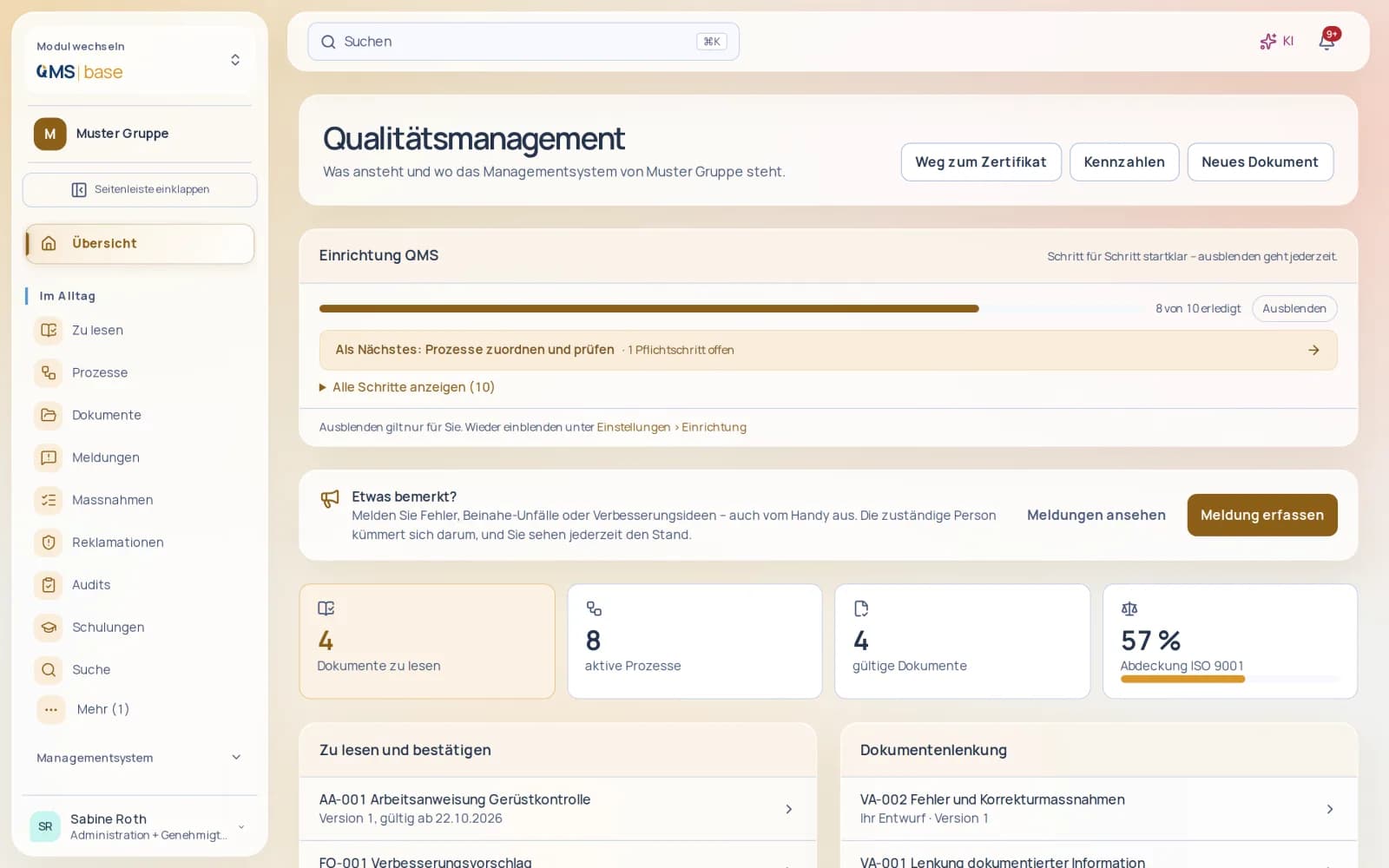
QMS | base overview with access to the certification plan
Just another Monday

What makes us special

  • See the next step

    You see available evidence for each standard chapter and what you can add next.

    Learn more
  • Collect reports easily

    You receive reports by email or QR form, with anonymous reporting available too.

    Learn more
  • Prepare for management review

    You get a management review bringing together objectives, audits and reports from your QMS.

    Learn more
  • Reinforce understanding

    You add comprehension questions before readers confirm they have read a document.

    Learn more
  • Audit preparation as a checklist

    You prepare audits with a shared checklist: evidence, owners and deadlines at a glance. In every app.

    Learn more

Need → solution

Need

“Your QM manual sits in a folder as a PDF – and nobody knows who has read the new policy?”

Solution

Every document goes to exactly the people it concerns: everyone, a company, a department, a job title or individual people. Whoever needs to read it sees it in “My tasks” and confirms with one click, after a few comprehension questions if you wish. Anyone still missing gets an automatic reminder.

Work instruction with approval and reading status in QMS | base
Open full-size image (new tab)

Need

“Before every audit you gather evidence from binders, Excel and emails – and hope nothing is missing?”

Solution

The gap report shows every applicable chapter of the standard that still lacks evidence and takes you straight to where you add it. Manual, evidence report, management review, audit reports and action list download as a single package. The certification body’s auditor gets time-limited, read-only access without an account, only to the areas you release. Every access is logged. You run your internal audits on site in the app, even offline. A finding with a photo creates the action right away.

Internal audit with checklist, findings and evidence in QMS | base
Open full-size image (new tab)

Need

“On the construction site, deficiencies end up on a scrap of paper – and the paper ends up who knows where?”

Solution

Site management records the safety walk right in the app, with deficiencies and photos, even offline. Everyone else reports a deficiency with a photo in the app as well. Photos arrive without location data, and nothing gets lost. Every deficiency becomes an action with a deadline, and the site file only closes once no deficiency is left open.

Construction site file with inspection, defects and actions in QMS | base
Open full-size image (new tab)

Need

“You want to get certified to ISO 9001 – but where do you start?”

Solution

One click loads the starter pack: chapter structure, process map with sample workflows, draft documents, roles and mapping to the standard, in your language. Then the “Path to certification” guides you through nine phases to the certification audit, with a target date and progress taken from your data. “Now” takes you straight to the next open task.

QMS | base overview with access to the certification plan
Open full-size image (new tab)

Need

“Who has had which training – and whose licence runs out next month?”

Solution

The qualification matrix shows everyone with an expiry traffic light. Training runs as a course or as e-learning with a quiz, and your people take the quiz right in the app. Those who pass receive a certificate, and the record sits in the competence register with its validity. When a new policy is approved, the people affected are enrolled straight into the matching training.

Just another Monday

Before

  1. At seven, a scrap of paper on the construction site lists three deficiencies – with no photo of any of them.
  2. In the office, the quality manager searches three binders for the current version of the scaffolding policy.
  3. Nobody knows who has already read the new policy, and the signature list has vanished.
  4. And for the audit in March, the evidence is still scattered across PDFs, Excel and emails.

After

  1. The site manager records the safety walk in the app: three deficiencies with photos, even offline – each one instantly becomes an action with a deadline.
  2. The scaffolding policy exists exactly once: controlled, approved and archived.
  3. Read confirmations come in through the app, and anyone still missing gets an automatic reminder.
  4. The Path to certification shows what is still missing before the audit – and the audit package is ready in one click.
Start your free first month

What makes the difference

From starter pack to certificate – guided

Starter pack in one click, a nine-phase plan up to the certification audit, a gap report per chapter of the standard, a downloadable audit package and time-limited, logged read-only access for the certification body – all in the same app.

Connected to HR and accounting

Your QM system uses what the business already has. Completed training lands in the competence register. From a justified complaint, you trigger the credit note in Finance with one click, for the right customer. Quality objectives pull their actual value from the data on their own: complaints, actions, qualifications and, with Finance, delivery reliability and complaint rate too.

For everyone in the business – on the move too

It’s not just the QM department that works with it. Everyone reports errors, near misses and deficiencies with photos in the app, even offline, and sees their mandatory reading in “My tasks”. Site management records safety walks in the app, auditors carry out the audit on site, and your people fill in forms and take the training quiz right in the app. All in German, French, Italian and English.

Free data migration

Switch without the effort – we transfer your data

Free data migration by KMU | base, within 24 hours on working days. When you commission data migration by KMU | base, the paid subscription and minimum term start immediately; this ends the free month. Upload your data securely through your dashboard under Settings › Data migration.

New in

  • Deadline for read confirmations

    the reading deadline shows as the due date in “My tasks”, overdue confirmations stand out, and reminders go only to those who are still open.

  • Import suppliers from files

    with category, service and contact person; dry run, approval and undo within 24 hours.

  • QMS on the go in the app

    complete actions, confirm mandatory reading, scan test equipment, handle reports, trace and block batches.

  • REST API and webhooks

    your systems read documents, processes, actions and reports and receive signed webhooks for approvals, reports and incidents.

  • QMS in the app

    Safety walks with deficiencies and photos and internal audits on site, even offline, plus the training quiz – right in the app.

  • Delivery reliability from Finance

    Link suppliers to the creditor in Finance; delivery reliability over the last twelve months appears on the supplier and in the management review.

  • KPIs that fill themselves

    Quality objectives pull their actual value from the data automatically.

  • Path to certification

    Nine phases up to the certification audit, with a target date and progress taken from your data.

  • Access for the certification body

    Time-limited read-only access without an account, selected areas only, every access logged.

  • Audit package

    Manual, evidence, management review, audit reports and actions in one download.

A complete app

No plugins. No modules. Everything included.

is a complete app – not a basic package that you first have to put together with paid extra modules. All 15 areas with 144 features, the AI and all updates are included in the price.

Common practice: the building-block model

A basic package – plus an extra module, a plugin or an add-on with its own price for every further area.

  • Basic packageExtra cost
  • Extra moduleExtra cost
  • Extra moduleExtra cost
  • PluginExtra cost
  • Add-onExtra cost
  • AI at extra costExtra cost

Many building blocks. Many prices.

With : one complete app

  • All 15 areas
  • 144 features
  • AI included
  • All updates included
  • Document control
  • Processes and responsibilities
  • Context and quality objectives
  • Starter pack and mapping
  • Audits
  • Reports and actions
  • Complaints
  • Risks, opportunities, ICS and occupational safety
  • Training and competence
  • Suppliers
  • Operational records and batches
  • Management review, meetings and reports
  • Customer surveys
  • Knowledge and communication
  • Occupational safety

One app. One login. Everything included.

Areas in one app
15
Features included
144
Extra modules needed
0
AI at no extra cost
incl.

Features

Everything this app includes.

runs your quality management where it actually happens: controlled documents with approval and read confirmation, processes with clear responsibilities, objectives with traffic lights, audits, reports and actions, complaints, risks, training, suppliers and management review. The starter pack provides the chapter structure, process map and draft documents – you adapt rather than start from scratch. The “To the certification audit in 90 days” path leads in nine phases to the certification audit, and your auditor receives time-limited, read-only access. Occupational safety is also included: safety contact, emergency organisation, specialist involvement, hazardous substances, operating instructions and construction sites.

Document controlEvery document checked, approved, distributed – and demonstrably read.10 features

Manual, procedures, work instructions and forms follow a defined path in , from draft to valid version. Who changes, who checks and who approves is recorded – as is who has read the new version. This is how you manage documented information under chapter 7.5 without binders or mass emails.

All features

  • Nine document types – manual, policy, process, procedure, work instruction, form, checklist, external document and record – each with its own number series.
  • Control workflow draft → review → approval → valid → withdrawn, with the option to reject.
  • Four-eyes principle: whoever writes a document cannot approve it themselves; the rule can be switched off if needed.
  • Version management with a change note for every new version.
  • Effective date, including future dates, with notification on the effective date.
  • Review interval per document, showing when the next review is due.
  • Distribution to everyone, a company, a department, a job title or individuals – with a reading obligation.
  • Read confirmation, read status per person and read rate per document.
  • Reading reminder sent automatically after a set number of days, or manually.
  • Control external documents such as laws or customer requirements with publisher and reference; the where-used list shows where they are used.

Your benefits

  • Only valid versions in circulation. Every document has a status, from draft to “withdrawn”. Your team works with the approved version, not an old copy from the shared drive.
  • Four eyes without extra effort. Whoever writes a document does not approve it themselves. Review and approval are separate permissions and remain traceable.
  • Reading is on record. Distribution, reading obligation and read confirmation show for every document who knows the current version – with the read rate for management.

Roles and permissions

  • Read valid documents and confirm reading: everyone with access to .
  • Create and revise drafts: people with the permission to edit documents.
  • Review and approval are two separate permissions – so you can assign approval specifically, for example to the quality manager.
  • Administer document control as a whole: people with the document administration permission.

Not by default: the four-eyes principle requires a second person. For very small teams, the rule can be switched off.

As external documents with publisher and reference. The where-used list shows where an external document is used in the system.

Processes and responsibilitiesProcess map, workflows and RACI – so it is clear who is responsible for what.10 features

describes your processes along chapters 4.4 and 5.3 of ISO 9001:2026: with profile, workflow, interfaces and clear roles. You enter workflows step by step in a form; the swimlane view and the check follow from it.

All features

  • Process map with management, core and support processes.
  • Process profile with purpose, scope, owners, inputs and outputs, key figures and a note on risks.
  • Workflow in swimlanes with start, activity, decision and end, entered in the form editor.
  • Step list as a text version of the workflow.
  • Workflow check that brings inconsistencies to light.
  • RACI per activity with a check: exactly one A, at least one R.
  • Interfaces to upstream and downstream processes.
  • Links between processes, controlled documents, quality objectives and chapters of the standard.
  • Roles with tasks, authorities and deputies, brought together in the responsibility matrix.
  • Organisation chart from your organisational data, without duplicate maintenance.

Your benefits

  • The whole company on one page. The process map clearly arranges management, core and support processes – the quickest introduction for new employees and for management.
  • Responsibilities without gaps. The RACI check requires exactly one accountable party (A) and at least one responsible party (R) per activity. Missing or duplicated responsibilities stand out immediately.
  • Workflows without a drawing tool. You enter steps, decisions and swimlanes in a form. The workflow check flags inconsistencies before anyone works to it.

Roles and permissions

  • View processes, process map, responsibility matrix and organisation chart: everyone with access to .
  • Create and edit processes: people with the process administration permission, typically process owners and the quality manager.
  • Maintain roles, tasks and authorities: people with the administration permission for leadership and organisation.

No. You enter steps in the form editor; displays the workflow in swimlanes, keeps a step list and checks the workflow.

From the organisational data you already maintain. Roles with tasks, authorities and deputies complete it to form the responsibility matrix.

Context and quality objectivesContext, quality policy and measurable objectives with traffic lights – at a glance in the cockpit.10 features

Before setting objectives, clarify the framework: scope, internal and external issues, interested parties. brings it all together along chapters 4, 5 and 6.2 of ISO 9001:2026 – right up to the traffic light that shows management where things are stuck.

All features

  • Scope, services, locations and quality culture described in one place.
  • Internal and external issues with category, impact and relevance.
  • Interested parties with their expectations and how they are monitored.
  • Quality policy as a controlled document with review, approval and read confirmation.
  • Formally appoint the quality manager.
  • Quality objectives with key figure, unit, direction, start and target value, tolerance and due date.
  • Process link and responsible person for each objective.
  • Actual values per reporting date with green, amber and red traffic lights and a progress indicator.
  • Record and tick off actions for each objective.
  • Traffic-light overview of all objectives in the cockpit.

Your benefits

  • Objectives you can measure. Every objective has a key figure, unit, direction, start and target value, tolerance and due date. Whether it is on track is decided by the figure, not gut feeling.
  • Traffic lights for management. Green, amber or red per objective, collected in the cockpit – a clear basis for the next management meeting.
  • Context you can follow. Issues and interested parties are recorded with category, impact, relevance and expectations. That explains why your quality management is set up the way it is.

Roles and permissions

  • View context, quality policy and objectives: everyone with access to .
  • Maintain context, interested parties and objectives: people with the administration permission for leadership and objectives, such as executive management and the quality manager.
  • As a controlled document, the quality policy follows the review and approval permissions of document control.

You enter them per reporting date directly on the objective. derives the traffic light and progress from the start, target and tolerance values.

It defines whether a higher or a lower value is better – for example rising on-time delivery or falling lead time. The traffic light follows it.

Starter pack and mappingReady to go with the ISO 9001:2026 chapter structure – and always know where you stand.9 features

The starter pack sets up the framework of your quality management: chapters, process map, draft documents, context, interested parties and roles. In standard mapping you assess chapter by chapter how far you have come – the cockpit shows the status.

All features

  • Starter pack with a chapter structure based on ISO 9001:2026 in its own short titles, without the text of the standard.
  • Process map, draft documents, context, interested parties and roles as a starting point.
  • Starter pack in English, German, French and Italian.
  • Applicability per chapter with justification.
  • Assessment per chapter – open, partial or fulfilled – with a coverage rate across all chapters.
  • Assign processes and documents to chapters.
  • Cockpit with open readings, control tasks, objective traffic lights and standard status.
  • “To the certification audit in 90 days”: nine phases up to the certification audit, with progress taken from your data, a plan with target date and owners, and a gap report per applicable chapter.
  • Help texts for every page of in four languages.

Your benefits

  • No blank page. You start with a well-thought-out structure and adapt it to your business – in English, German, French or Italian.
  • Gaps at a glance. Open, partial or fulfilled per chapter: the coverage rate shows how far your quality management has come.
  • Everything linked. Processes and documents are assigned to the chapters. You see immediately what covers a requirement.

Roles and permissions

  • View standard mapping and the cockpit: everyone with access to .
  • Adopt the starter pack and maintain standard mapping and settings: people with the administration permission for settings, usually the quality manager.

The text of the standard is protected by copyright. The chapter structure therefore uses its own short titles; you keep the wording in your own copy of the standard.

No. Processes, documents and roles can be adapted to your business – the starter pack is the starting point, not the result.

AuditsAudit programme, checklists and findings – from the plan to the approved report.12 features

manages internal audits, external audits and supplier audits under chapter 9.2 of ISO 9001:2026 in one place: a multi-year programme, an audit plan with the team, checklists, on-site recording and the report. Nonconformities go straight into actions – nothing gets stuck in the audit binder.

All features

  • Audit programme over up to three years, showing the audits per year and the active processes not yet covered by any audit in the period.
  • Internal audits, external audits and supplier audits with date, scope, objectives, criteria, processes and standard chapters.
  • Audit number per year, plus lead auditor and auditors per audit.
  • Independence check: anyone responsible for a process within the audit scope is flagged as not independent.
  • Overview of auditors with their qualification records and their validity from the competence records.
  • Reusable checklists with audit questions, also generated from selected standard chapters; the questions are frozen when the audit is prepared.
  • Offline recording during the audit: data syncs on reconnection, and you decide conflicts with other people’s changes yourself.
  • Findings as major or minor nonconformity, observation, opportunity for improvement or strength; nonconformities create an action with a deadline, major ones also a nonconformity report.
  • Audit report with summary and conclusion as a PDF, filed in the archive after approval.
  • External audits with certificate number and expiry date; a warning appears 90 days before expiry.
  • Auditor access for external auditors: limited to 1–90 days, selected areas only, read-only, every access logged, revocable at any time.
  • Audit package as a ZIP with manual, evidence report, management review, audit reports and actions.

Your benefits

  • Gaps in the programme are visible. The audit programme shows the audits per year and which active processes are not yet covered by any audit in the period.
  • Independent auditing. Anyone responsible for a process within the audit scope is flagged as not independent. You see the auditors’ qualifications from the competence records.
  • Findings with consequences. Nonconformities create an action with a deadline; major nonconformities also create a nonconformity report. This turns the audit into improvement.

Roles and permissions

  • Plan and maintain the audit programme, audits and checklists: people with the audit administration permission.
  • Record answers and findings: the lead auditor and auditors of the audit concerned, without any further permission.
  • The lead auditor writes the report; it is approved by people with the audit administration permission.
  • People with the audit administration permission see all audits; everyone else sees the audits they take part in.

Yes. The checklist can be filled in without a connection. As soon as you are back online, syncs the answers; you decide any conflicts with other people’s changes yourself.

It automatically creates an action with a deadline. A major nonconformity also creates a nonconformity report, which you handle with root cause analysis.

Reports and actionsReport, find the root cause, implement actions and check effectiveness – CAPA and 8D in one place.12 features

Errors, near misses and ideas are reported where they happen – in the browser or via link and QR code. takes every report through root cause analysis, actions and effectiveness check. Actions from reports, audits, risks and meetings come together in one overview.

All features

  • Reports from all employees – nonconformity, improvement suggestion or near miss – with location, project, process, priority and photos, anonymously if they wish.
  • Reporting channels with their own number prefix, report types, confidentiality, handlers and labels.
  • Public reporting form via link or QR code without login, with a personal tracking link – including for anonymous reports.
  • Confidentiality open, internal or confidential: confidential reports are visible only to the reporter, the channel’s handlers and the person responsible.
  • Internal notes for the team and external replies that reporters also see via the tracking link.
  • Photos and PDFs attached to the report; HEIC photos are converted and every file is scanned for viruses.
  • CAPA with immediate action, root cause analysis by 5×Why, Ishikawa or freely, root cause and costs in CHF.
  • Effectiveness check with date and result before a report is closed, plus an 8D report with D1 to D8 as a PDF.
  • Actions from all sources as a Kanban board with open, in progress and done, or as a list – all of them or only your own.
  • Recurring actions from monthly to yearly and escalation of overdue items to the quality manager after the set number of days.
  • Whistleblowing system: reporting channels with case managers, reports also anonymous via a link, acknowledgement and feedback on time; only case managers see the cases, and the content is encrypted.
  • Requests and tickets to teams such as IT, HR, finance, QMS or facilities – across all apps, with queues, due dates and conversion into tasks.

Your benefits

  • Reporting made easy. All employees report nonconformities, improvement suggestions and near misses with photos, anonymously if they wish. External parties report without logging in via link or QR code.
  • Cause, not symptom. Immediate action, root cause analysis with 5×Why or Ishikawa and an effectiveness check bring every report to a structured close.
  • All actions in one place. Actions from reports, audits, risks, controls, changes, forms, reviews and meetings appear in one overview – as a Kanban board or a list.

Roles and permissions

  • Submit reports and track your own: everyone with access to .
  • Handle reports, run CAPA and 8D: the channel’s handlers, the person responsible and people with the permission to handle reports.
  • Set up reporting channels: people with the report administration permission. Even this permission does not open confidential reports.
  • Everyone responsible edits their own actions; other actions are edited by people with the permission of the area concerned, such as audits or risks.

Yes, if the reporting channel allows it. Via the personal tracking link they see the status and the replies without revealing their name.

Via the public reporting form of a reporting channel, by link or QR code and without logging in. They track the status via their personal tracking link.

ComplaintsRecord, assess and answer customer complaints – then ask about satisfaction.9 features

In , complaints are reports with a customer reference: you record customer, company, email and reference, assess whether the complaint is justified and record the reply and credit amount. Root cause analysis and actions work as for any nonconformity. After closing, you ask the customer how satisfied they are.

All features

  • Customer complaints with customer, company, email and reference in their own filterable list.
  • Assessment as justified, partly justified or unjustified.
  • Record the reply to the customer and the credit amount in CHF.
  • Immediate action, root cause analysis with 5×Why or Ishikawa and costs in CHF, as for any nonconformity.
  • Actions for the complaint with responsibility and deadline, plus an effectiveness check before closing.
  • Internal notes and external replies kept separate.
  • Photos and PDFs attached to the complaint, every file scanned for viruses.
  • Feedback link by email after closing, valid for 60 days, for satisfaction from 1 to 5 and a comment – without login.
  • Customer satisfaction from this feedback automatically feeds into the management review.

Your benefits

  • Every complaint in view. All customer complaints are in their own filterable list – separate from internal reports.
  • Clear decisions. Justified, partly justified or unjustified: the assessment, the reply to the customer and the credit amount in CHF are recorded traceably.
  • Satisfaction measured. After closing, the customer receives a link to rate their satisfaction from 1 to 5 and leave a comment.

Roles and permissions

  • Record complaints: people with the permission to handle reports. The channel’s handlers and the person responsible can also handle them.
  • The customer gives feedback without logging in via their personal link.
  • Analyses of complaints are visible to people with the permission to view reports.

You record your reply with the complaint. After closing, you send the customer a link by email where they give their satisfaction rating and a comment.

60 days. The customer needs no account; a rating from 1 to 5 and, if they wish, a comment are all it takes.

Risks, opportunities, ICS and occupational safetyAssess and treat risks and opportunities, and secure them with internal controls.11 features

keeps risks and opportunities under chapter 6.1 of ISO 9001:2026 in separate registers, with a configurable matrix and the history of every assessment. Internal controls define what is checked and how often – a deficiency becomes an action straight away. Occupational safety is also included: safety contact, emergency organisation, specialist involvement, hazardous substances, operating instructions and construction sites.

All features

  • Separate registers for risks (R-) and opportunities (C-) with category, causes, consequences, process, context issue and owner.
  • Configurable risk matrix with levels per axis and thresholds for amber and red.
  • Matrix view of all risks and opportunities.
  • Strategy matching the type: avoid, reduce, transfer or accept for risks; exploit, enhance, share or forgo for opportunities.
  • Target rating and history of every reassessment.
  • Actions for the risk; the risk switches to “in treatment”.
  • Internal controls with objective, risk and process reference, owner and checkpoints.
  • Frequency from daily to yearly with the next due date calculated automatically.
  • Execution with an answer per checkpoint; a deficiency creates an action if you wish.
  • Notification to the owner on the due date of a control.
  • Occupational safety with a safety contact, safety and emergency organisation, a checklist for specialist involvement, hazardous substances, operating instructions and construction sites.

Your benefits

  • A matrix that fits you. You set the levels per axis and the thresholds for amber and red yourself. All risks and opportunities appear in the matrix.
  • Assessments with history. Strategy, target rating and every reassessment remain visible – traceable for audits and management.
  • Controls that happen. Every control has a frequency, an owner and checkpoints. A reminder arrives on the due date, and calculates the next due date itself.

Roles and permissions

  • View risks, opportunities and the matrix: everyone with access to .
  • Maintain risks, opportunities and controls: people with the risk administration permission.
  • Carry out a control: the owner or people with the risk administration permission.
  • Configure the risk matrix: people with the administration permission for the settings.

Because they are treated differently: you avoid or reduce risks, and exploit or enhance opportunities. offers the matching strategies for each type.

A recurring check with fixed checkpoints, such as reviewing payment approvals. You set the frequency and owner; sends a reminder on the due date and records every execution.

Training and competenceWho needs to know what, who knows what – and the right training with proof.10 features

links requirements per job title with your training offering, under chapters 7.2 and 7.3 of ISO 9001:2026. Employees register themselves, learn on site or online and receive a certificate on completion – the record goes into the competence records automatically.

All features

  • Requirements per job title as mandatory or recommended.
  • Qualification matrix with required, actual, expiry warning and degree of fulfilment, filterable by job title.
  • Training catalogue for classroom, online and e-learning training with sessions, location, online link, seats and trainer.
  • Self-registration with waiting list and automatic move-up; training that requires approval goes through a request.
  • E-learning with lessons and progress display; registered participants are reminded of their session the day before.
  • Quiz with a pass mark in percent, for training and for documents.
  • Completion with certificate number, PDF certificate and entry in the competence records with validity.
  • Feedback from participants and assessment of effectiveness by administrators.
  • Everyone sees their own participations and open mandatory training; the training plan shows who has not yet completed which mandatory training.
  • Training before entry into force: when a document is approved, its distribution list is registered for the linked training, and read confirmation is only possible after completing the training.

Your benefits

  • Gaps at a glance. The qualification matrix shows required and actual per person, expiring records and the degree of fulfilment – filterable by job title.
  • Less organising. Employees register themselves. Full sessions lead to a waiting list with automatic move-up, and registered participants are reminded the day before.
  • Proof without paper. A PDF certificate and an entry in the competence records with validity are created automatically on completion.

Roles and permissions

  • Register, learn, take quizzes and give feedback: everyone with access to .
  • Maintain the training catalogue, requirements, qualification matrix and training plan, and approve requests: people with the training administration permission.
  • Assess the effectiveness of training: also people with the training administration permission.

From the competence records. Completed training is entered there automatically as a record with validity; the matrix compares it with the requirements per job title.

Yes. Link the document to a training: on approval, the recipients are registered, and read confirmation is only possible after completing the training.

SuppliersApprove and evaluate suppliers – and raise complaints when something goes wrong.10 features

manages your external providers under chapter 8.4 of ISO 9001:2026: with status, evaluation by weighted criteria and complaints. notifies the quality manager when a re-evaluation is due – keeping the supplier list current.

All features

  • Supplier list with category, service, contact person and email, with search and status filter.
  • Status new, approved, conditional or blocked.
  • Evaluation with 1 to 5 points by weighted criteria – quality, delivery, price, communication and complaints – or by your own criteria.
  • Status suggestion from the evaluation result.
  • The criteria of the last evaluation serve as the template for the next one.
  • Evaluation history per supplier with date and evaluator.
  • Date of the next evaluation with a reminder to the quality manager as soon as it is due.
  • Complaint to the supplier as a nonconformity linked to the supplier, recorded directly with the supplier; the list shows the number of complaints.
  • Supplier audits with checklist, findings and report.
  • Batches with supplier and receipt date for traceability.

Your benefits

  • Clear status. Every supplier is new, approved, conditional or blocked. The list shows the status together with the latest evaluation and the number of complaints.
  • Systematic evaluation. Points from 1 to 5 per criterion, weighted as you specify. Based on the result, suggests a status.
  • Nothing forgotten. You set the date of the next evaluation for each supplier. When it is due, reminds the quality manager.

Roles and permissions

  • View the supplier list and evaluations: everyone with access to .
  • Create and evaluate suppliers and set their status: people with the supplier administration permission.
  • Record complaints with a supplier: people with the permission to handle reports; supplier administrators can also view them.

Yes. By default you evaluate by quality, delivery, price, communication and complaints; you can define your own criteria with your own weighting. The criteria of the last evaluation serve as the template for the next one.

You record a complaint with the supplier. It is handled as a nonconformity, where you work on cause and actions.

Operational records and batchesChecklists for requirements, development and release – and batches you can trace.8 features

For chapters 8.2 to 8.5 of ISO 9001:2026, keeps operational records with checklist and approval – from reviewing customer requirements to post-delivery activities. You record batches with supplier and usage; if it comes to it, you see the chain in both directions and block affected batches.

All features

  • Six record types: customer requirements, development, release of products and services, traceability, external property and post-delivery activities.
  • Checklist per record from the template, freely extendable.
  • Submit, approve or reject by an authorised person; with the four-eyes principle, the responsible person does not approve their own record.
  • Record list with search and filter by type and status.
  • Batches with item, supplier, receipt date and quantity.
  • Usage in follow-on batches and dispatch to recipients with reference and quantity.
  • Forward and backward traceability: every batch shows its origin and its usage.
  • Batch block, optionally including all follow-on batches, to prepare a recall.

Your benefits

  • Checklists, not memory. Each record type comes with a checklist from the template that you can extend freely.
  • Approval by a second person. You submit a record, an authorised person approves or rejects it – with the four-eyes principle, not the responsible person themselves.
  • Traceability in both directions. From the incoming batch to the follow-on batch and the recipient – and back. If needed, you block a batch together with all follow-on batches.

Roles and permissions

  • Create, edit and block records and batches: people with the permission to edit records.
  • Approve or reject records: people with the record approval permission; with the four-eyes principle, not the responsible person.

They prove that requirements were reviewed, developments verified and products and services released. Each record type comes with a matching checklist.

You open the affected batch and see which follow-on batches it went into and to whom it was delivered. Then you block the batch and, if you wish, all follow-on batches.

Management review, meetings and reportsManagement review, quality meetings and analyses – with decisions that are followed up.10 features

For the management review under chapter 9.3 of ISO 9001:2026, gathers the inputs itself: objectives, audits, reports, complaints, actions, risks and more. Management assesses, decides and approves the minutes. Quality meetings, analyses and a gap list before certification complete the picture.

All features

  • Management review populated automatically with objectives, audits, reports, complaints including customer satisfaction, actions, risks, controls, documents, standard coverage, context and earlier decisions – as a snapshot.
  • Assessment per section by management.
  • Decisions are followed up as actions with owner and due date.
  • Minutes as a PDF after approval, filed in the archive.
  • Quality meetings with location, online link, participants and agenda items; participants are notified.
  • Keep the meeting minutes directly in .
  • Decision tracking: all open decisions from meetings and reviews with owner and due date.
  • Analyses with charts from twelve building blocks, such as reports, actions, objective trends, read rate, forms and usage, over selectable months.
  • Save report templates and export reports as Excel or CSV.
  • Certification readiness with 14 checkpoints from context to standard coverage and the next steps.

Your benefits

  • Prepared, not pieced together. The management review takes over the inputs from all areas as a snapshot. You assess instead of copying figures from spreadsheets.
  • Decisions that don’t get lost. Decisions from reviews and meetings are followed up as actions, with owner and due date.
  • Ready for the certification audit. 14 checkpoints from context to standard coverage show where gaps remain and name the next steps.

Roles and permissions

  • Create, conduct and approve management reviews and meetings: people with the management review administration permission.
  • Participants see their meetings; owners see the decisions assigned to them.
  • View analyses and certification readiness: people with the permission to view reports. Reports show aggregated figures, no personal data.

From itself: objectives, audits, reports, complaints, actions, risks, controls, documents, standard coverage, context and earlier decisions are taken over as a snapshot when the review is populated.

Yes. You save reports as templates and export them as Excel or CSV.

Customer surveysAsk about customer satisfaction via link or QR code – and track it as a KPI in your quality objective.9 features

For customer satisfaction under chapter 9.1.2 of ISO 9001:2026, you create your own surveys in . Customers answer via link or QR code without logging in; the analysis appears per question and, if you wish, feeds directly into a quality objective.

All features

  • Customer surveys with scale questions from 1 to 5, NPS questions from 0 to 10 and text questions.
  • Suggested questions as a starting point, introduction text and mandatory questions.
  • Activate and close the survey, with an optional end date.
  • Public link with QR code: customers answer without logging in, optionally stating their company.
  • Spam protection and a limit on responses per IP address.
  • After the first response the questions are fixed, so the analysis stays comparable.
  • Analysis per question with average, distribution, NPS and all text answers.
  • Number of responses and responding companies at a glance.
  • Transfer the result as an actual value to a quality objective – the NPS or satisfaction in percent.

Your benefits

  • Quick to create. Suggested questions with scale, NPS and free text provide the framework; you adapt them and add your own.
  • Easy for customers. A link or QR code is all it takes: customers answer without an account and without logging in.
  • Measurable in the objective. The result feeds into your quality objective as an actual value – with traffic light and progress.

Roles and permissions

  • Create, activate, close and analyse surveys: people with the customer survey administration permission.
  • Transfer the result to a quality objective: also people with the customer survey administration permission.
  • Customers answer without logging in via the public link or QR code.

No. They open the link or scan the QR code and answer directly. Spam protection and a limit per IP address keep the results clean.

If the survey contains an NPS question, the NPS is transferred; otherwise the average of the scale questions in percent. The value is recorded as an actual value with today’s date.

Knowledge and communicationWiki, glossary, news and team spaces – so knowledge stays in the company and everyone is informed.10 features

secures your organisation’s knowledge under chapter 7.1.6 and supports communication under chapter 7.4 of ISO 9001:2026: in the wiki with approval and versions, in the glossary with explained terms, with news and events for everyone and with protected spaces for individual teams.

All features

  • Wiki with categories, search and approval workflow: draft, review, approved, archived.
  • All employees propose pages; administrators approve them.
  • Versions: every change to an approved page becomes a new version, earlier versions remain viewable.
  • Knowledge article from a resolved report with problem, cause and solution, as a draft in one click.
  • Glossary with definition and synonyms per term.
  • Automatic explanation of glossary terms in the wiki, processes and documents.
  • Glossary import and export as CSV.
  • News and events with date and location; everyone or the space members are notified.
  • Comments and reactions – thumbs up, heart, idea or question – on news and wiki pages.
  • Protected team spaces with their own news and wiki pages, visible only to members.

Your benefits

  • Knowledge with approval. Everyone proposes wiki pages, administrators review and approve them. Every change to an approved page becomes a new version.
  • Terms explained. Terms from the glossary are recognised and explained automatically in the wiki, processes and documents.
  • Learning from mistakes. A resolved report becomes a wiki draft with problem, cause and solution in one click.

Roles and permissions

  • Read the wiki, propose pages, comment and react: everyone with access to .
  • Approve wiki pages, maintain the glossary, publish news for everyone and set up team spaces: people with the knowledge administration permission.
  • In a team space, members publish news and wiki pages themselves; others do not see the space – administrators not automatically either.
  • Create knowledge articles from reports: people with the permission to handle reports.

Only the members and whoever set up the space. Even the knowledge administration permission does not open a space automatically.

You add terms with definition and synonyms individually or import a CSV file. then explains the terms automatically in the wiki, processes and documents.

Occupational safetyAssess hazards, report incidents and document inspections.4 features

Assess hazards, report incidents and document inspections.

All features

  • Risk assessments by work area and activity, including protective measures and residual risk.
  • Record occupational safety incidents and other events with internal reporting deadlines.
  • Document site inspections with findings and safety measures.
  • Manage emergency arrangements, first aiders and hazardous substances with safety data sheets.

Your benefits

  • Occupational safety Assess hazards, report incidents and document inspections.

Working together

One workflow across all apps.

When you subscribe to several apps, your business functions connect. Shared users, roles and permissions determine access.

Training records and qualifications use the same skills master data. displays them in the personnel file, in the qualification matrix.

Evaluate suppliers using the same contact record as accounts payable. flags blocked suppliers and provides figures such as complaint costs.

The manual, supporting records and audit reports are accessible through the same search and folder structure as your other documents.

One login. Four languages. Data in Switzerland.

Work in German, French, Italian or English. The shared platform is hosted in Swiss data centres.

Employee app

In the employee app: record reports with photos, scan QR codes, complete checks and actions.

More about the employee app

Switzerland · Your permissions · Approval before action

AI included in

  • Answer process questions

    Get answers from approved process versions – with sources.

  • Record actions

    Prepare reports, events and actions from text for approval.

  • Prepare audits

    Draft audit checklists from standards and processes.

  • Explain changes

    Summarise changes and generate training questions.

Included in every app – at no extra cost.

More about AIAll AI features

Pricing per app

No user limits. All users included.

Your price for : base price plus app, by employee count. All features, all users, AI and storage are included.

Online base: CHF 49 per month per website – shop included, redesign included. Plus the KMU base base price of CHF 49 per month, charged once (covers all apps together). Website only: CHF 98 per month. You run the shop directly from Finance | base: products, stock, orders and invoices, fully integrated. The shop requires Finance | base. Minimum 12 months. Migration included.

  • Base priceCHF 49.–User and permission management, access, mobile app, AI and storage for the whole company. Stays the same above 20 employees.
  • Per appCHF 29.–HR, Finance, QMS, Docu, Sales: your choice, at least one. Price up to 20 employees.
  • Per app and additional person+CHF 1.–For each person above 20 employees. Below 20, the price for 20 applies.

Included for the whole company: up to 20 employees around 12’500 AI tasks per month (guideline) and 100 GB of storage; per additional person around 200 AI tasks and 2 GB more.

The first month is free, followed by a minimum term of 12 months. Above 1’000 employees, we prepare a quote. Request a quote

Only when you need it

  • SMS and post at pass-through cost
  • AI extra pack CHF 25.–, around 5’000 additional AI tasks in the current month
  • An extra 100 GB of storage for CHF 10.– per month
  • Sales emails above 10’000 per month: CHF 2.– per 1’000
  • 3 companies included, each additional company CHF 25.– per month
  • Dedicated server in Switzerland: CHF 390.– per month; included from 1’000 employees with at least 3 apps. Above 1’000 employees, a quote includes a dedicated server with at least 3 apps.

No setup fees, free data migration. When you commission data migration by KMU | base, the paid subscription and minimum term start immediately; this ends the free month.

The first month is free. When you commission data migration by KMU | base, the paid subscription and minimum term start immediately; this ends the free month.

Good to know

Frequently asked questions

is the complete quality management app from : processes, document control, audits and actions with a guided path to ISO 9001 certification. Everyone in the company reads, confirms and reports free of charge, AI is included, and the data stays in Switzerland.

costs CHF 29.– per month for up to 20 employees, plus the base price CHF 49.–, excl. VAT. All users included. The first month is free.

No user limits. All users included. The price is made up of the base price, the chosen apps and the number of employees. Each active person counts, including part-time staff, apprentices and temporary staff. Applicants and former employees do not count. Without , you declare the number yourself and confirm it when signing up.

A chapter structure based on ISO 9001:2026, a process map, draft documents plus context, interested parties and roles as a starting point – in English, German, French or Italian. You adapt everything to your business.

No. The chapter structure uses its own short titles because the text of the standard is protected by copyright. You use the wording from your own copy of the standard; in standard mapping you assign processes and documents to the chapters.

Under “Read”, everyone sees their open reading obligations and confirms they have read them. If a reading remains open, sends an automatic reminder after the set number of days; those responsible see read status and read rate per document.

The starter pack and help texts are available in English, German, French and Italian – ideal for businesses with teams in several language regions.
Part of

Five complete apps – discover the whole family.